Up until now, we’ve focused on verifying the behavior of individual methods or sequences of methods — ensuring that a specific function call or set of calls, given certain inputs, produces the correct changes in state. But there’s another, more universal aspect of verification: invariants.
Invariants are conditions that must always hold true for the contract’s state, no matter which function is called or in what order. If any execution — whether direct or via a sequence of calls — violates an invariant, it signals a fundamental flaw in the contract’s design, potentially exposing a bug or vulnerability.
In this article, we’ll explore how to formally specify and verify such properties using Certora’s CVL built-in invariant construct.
Defining Invariants in CVL
CVL’s built-in invariant construct is a formal specification mechanism that allows developers to define universal properties (invariants) that must hold throughout the lifetime of a smart contract, i.e., from the time the constructor executes to any state the contract may reach in the future.
Invariants in CVL are defined using the invariant keyword, followed by a unique name (identifier), optional parameters, and a boolean expression that describes the condition that must always hold true, as shown below:
invariant invariant_name(optional_parameter_1, optional_parameter_2, ...)
boolean_expression_in_CVL;
An invariant is considered to hold and is reported as verified (✅) if its boolean expression, defined in the invariant, evaluates to true in every reachable state of the contract and for all possible values of its parameters. We’ll explore the invariant verification process in more detail later in this chapter.
How Invariants Differ from Rules
A rule in CVL is designed to check if a specific property holds true within a defined scenario: starting from a certain state, performing certain actions, and then checking an outcome.
rule check_balance_updates(env e) {
// 1. Starting State
address user = e.msg.sender;
uint initial_balance = balanceOf(user);
// 2. Actions
uint amount;
deposit(amount); // Call the deposit function
// 3. Outcome Check
uint final_balance = balanceOf(user);
assert final_balance == initial_balance + amount, "Deposit did not correctly update balance";
}
In other words, it answers the question: “Does this particular action (or sequence of actions) lead to the expected outcome?”
Unlike rules, which focus on specific scenarios, an invariant in CVL expresses a condition that must always be true in every reachable state of the contract, regardless of which functions are called or in what order.
Below is an example of a simple invariant that states that the value of count should never become negative:
invariant count_cannot_be_negative()
count() >= 0;
Put simply, it answers the question: “Is this condition universally true, regardless of how the contract is used?"
When to Use Invariants vs. Rules
Deciding whether to use a rule or an invariant in CVL depends on the nature of the property we’re aiming to verify.
When to Use a Rule: Verifying Specific Scenarios
Opt for a rule when your goal is to verify behavior within a defined context or a specific sequence of operations. For example:
- The
withdraw(amount)function should correctly deductsamountfrom the caller’s balance and transfers it, but only ifbalanceOf(caller) >= amount. - Verifying that an attempt to
mintbeyond a maximum supply cap correctly reverts. - Checking that an admin function can only be successfully called by the designated admin address.
In essence, rules are your go-to way for answering: “Does this function (or sequence of functions) work correctly in this particular situation?”
When to Use an Invariant: Enforcing Fundamental Truths
Choose an invariant when you want to verify a property that must hold true across every possible state and every possible sequence of function calls. For example:
- In an ERC-20 implementation, the
totalSupplymust always equal the sum of all individual user balances. - In a lending protocol, the total value of collateral must always be greater than or equal to a certain percentage of the total debt, assuming liquidations are working properly.
- In a token contract, a user’s balance can never become negative.
Invariants provide the strongest guarantees about the long-term integrity and safety of your contract’s state. They answer the critical question: “Is this fundamental property of my contract unbreakable, no matter what?”
Scope of Verification: Rules vs Invariants
When verifying a rule, the Prover checks whether the assertions hold for the specific scenario defined in the rule—based on the initial state, actions taken, and any assumptions. Rules offer flexibility for exploring custom paths or edge cases, but they only verify correctness along the execution paths explicitly constructed in the specification.
In contrast, an invariant must hold regardless of which functions are called, with what parameters, or in what order. The Prover must make sure that the invariant is maintained in every reachable state of the contract. This is achieved through a two-part proof principle based on mathematical induction:
- Base Case: The property must hold immediately after contract deployment—i.e., it must be established by the constructor.
- Inductive Step: For every public or external function in the contract, if the property holds before the function is called, it must still hold after the function call.
If both the base case and the inductive step are proven, the prover reports the invariant as verified (✅).
Writing an Invariant in Certora
To understand how invariant verification works in practice, let’s look at the simple Voting contract from the Certora documentation :
// SPDX-License-Identifier: MIT
pragma solidity 0.8.25;
/// @title A simple voting contract
contract Voting {
// `hasVoted[user]` is true if the user voted.
mapping(address => bool) public hasVoted;
uint256 public votesInFavor; // keep the count of votes in favor
uint256 public votesAgainst; // keep the count of votes against
uint256 public totalVotes; // keep the count of total votes cast
/// @notice Allows a user to vote in favor of the proposal.
function voteInFavor() external {
// Ensure the user has not already voted
require(!hasVoted[msg.sender], "You have already voted.");
hasVoted[msg.sender] = true;
votesInFavor += 1;
totalVotes += 1;
}
/// @notice Allows a user to vote against the proposal.
function voteAgainst() external {
// Ensure the user has not already voted
require(!hasVoted[msg.sender], "You have already voted.");
hasVoted[msg.sender] = true;
votesAgainst += 1;
totalVotes += 1;
}
}
The Voting contract above allows users to cast a single vote either in favor of or against a proposal. To prevent double voting, the contract uses a hasVoted mapping that records whether an address has already participated. It tracks votes through three separate counters: votesInFavor, votesAgainst, and totalVotes. When a user casts a vote using either the voteInFavor() or voteAgainst() functions, the appropriate counter is incremented, and the hasVoted status is updated.
Identifying the Key Invariant in the Voting Contract
Since we aim to formally verify invariants of our Voting contract, we first need to identify its key properties. Looking at our Voting contract, one of the crucial invariants is that the total number of votes should always equal the sum of votes in favor and votes against.
With this key invariant identified, let’s walk through the process of formally specifying and verifying it using Certora.
Setting Up Your Project Environment
To begin verifying our invariant, we first need to set up our project structure and environment. To do so, follow the instructions below:
- Create an empty directory named
certora-invariants-examples, and navigate into it. - Inside your project directory, create a Python virtual environment for the project by running the following command.
virtualenv certora-env
- Activate the Python virtual environment you created by running the command below.
source certora-env/bin/activate
- Run the command below to install the Certora-CLI in your virtual environment.
pip3 install certora-cli
- Run the command below to install the solc-select in your virtual environment.
pip3 install solc-select
- In your project directory, create three subdirectories named
contracts,specs, andconfs - In your project directory, navigate to the
contractssubfolder and create a file namedVoting.sol. Then, paste the above discussedVotingcontract into that file.
Defining the Invariant in a Specification File
Once the project environment is ready, the next step is to create a specification file where we will define our invariant.
1. Create a Specification File: In your project directory, navigate to the specs subfolder and create a specification file (e.g., invariant.spec). This file will contain your CVL rules, including the invariants you want to verify.
2. Declare the Invariant: Inside your specification file, use the invariant keyword to define an invariant. Give it a descriptive name that clearly conveys what the rule checks.
invariant totalVotesMatch()
3. Insert the Invariant Condition as a CVL Expression: Next, specify the condition that must always hold true. In the case of the Voting contract, we want to ensure that the total number of votes is always equal to the sum of votes in favor and votes against:
invariant totalVotesMatch()
to_mathint(totalVotes()) == votesInFavor() + votesAgainst();
Note: to_mathint is used to convert Solidity’s uint256 to Certora’s mathematical integers for safe comparison. There is no need to apply it to the right-hand side of the equation, because in CVL, the results of all arithmetic operations are automatically of type mathint .
4. Add the Methods Block: Next, let’s add a Methods Block at the top of our specification with correct entries.
methods {
function totalVotes() external returns(uint256);
function votesInFavor() external returns(uint256);
function votesAgainst() external returns(uint256);
}
invariant totalVotesMatch()
to_mathint(totalVotes()) == votesInFavor() + votesAgainst();
Declaring Functions as envfree: Since the getter functions votesInFavor(), votesAgainst(), and totalVotes() do not depend on the execution environment (i.e., they do not read from msg.sender, msg.value, or any other global variables), we can declare them as envfree.
methods {
function totalVotes() external returns(uint256) envfree;
function votesAgainst() external returns(uint256) envfree;
function votesInFavor() external returns(uint256) envfree;
}
invariant totalVotesMatch()
to_mathint(totalVotes()) == votesInFavor() + votesAgainst();
Running the Verification
Once your project directory is set up correctly, follow the steps below to run the Certora Prover and verify your invariant.
1. Create a Configuration File: In the confs subfolder, create a configuration file (e.g., invariant.conf) and paste the code below in it.
{
"files": [
"contracts/Voting.sol:Voting"
],
"verify": "Voting:specs/invariant.spec",
"msg": "Testing Invariant"
}
2. Add Certora Personal Access Key: In your project directory, create a .profile, .bashrc, or .zshenv file (depending on your operating system and shell) and add the following line to set your Certora Personal Access Key as an environment variable.
#certora access key
export CERTORAKEY=<add-your-certora-access-key-here>
3. Load the Environment Variable: After adding the key, load the environment variables into your current terminal session by running the appropriate command shown below.
# For bash users
source .profile
# For zsh users
source .zshenv
4. Adding the Solidity Compiler: Before we run the Prover, we need to add the correct Solidity compiler. To add and use the correct Solidity compiler version, run the commands below.
solc-select install 0.8.25
solc-select use 0.8.25
5. Running the Prover: To verify your invariant, run the following command from your project’s root directory.
certoraRun confs/invariant.conf
If the Prover compiles your smart contract and specification file successfully—without encountering any syntax or semantic errors, it will generate a link to the verification report and print it in your terminal output.
To view the verification result, open the link printed in your terminal using a browser. The results should look similar to the image below:
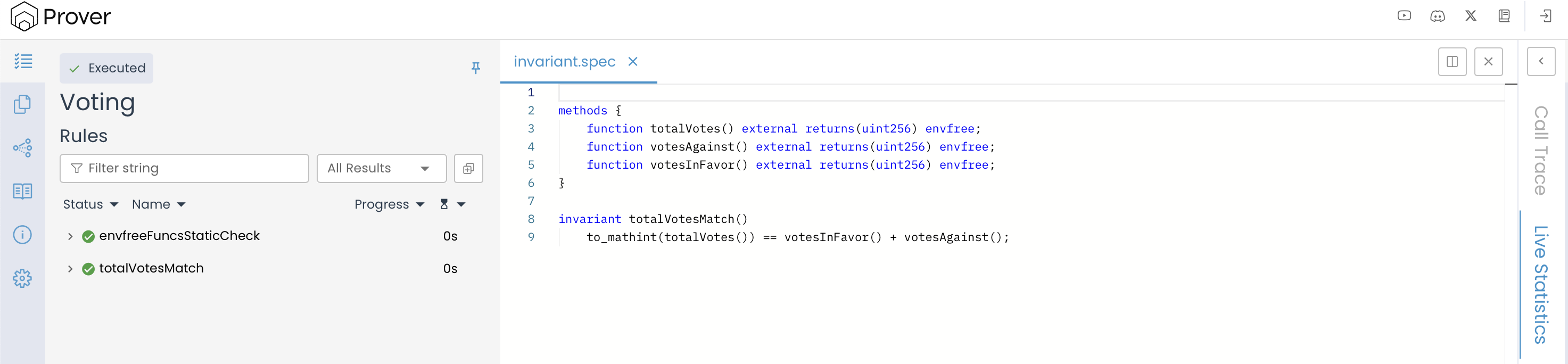
Note: Depending on the complexity of your specification and the current Prover queue, it may take a few minutes for your job status to change from Queued to Executed. This delay is normal, so don’t worry.
The above shown verification result confirms that the Prover has successfully validated our invariant. This means that, based on the analysis, no scenario was found where the invariant could be broken, indicating that it consistently holds throughout the contract’s behavior.
To better understand what it means for an invariant to be “successfully validated,” let’s examine how the Prover verifies invariants behind the scenes.
How Are Invariants Verified?
When an invariant is submitted for verification, the Prover performs two essential checks to ensure its correctness, which directly correspond to the two-part proof principle (based on mathematical induction) discussed earlier:
- Initial-state Check: First, the Prover verifies that the invariant holds immediately after the contract’s constructor finishes executing. This is the Base Case of our inductive proof.
- Inductive Step: Next, the Prover checks that every public and external method preserves the invariant across its execution. This corresponds to the Inductive Step, making sure that if the property holds before a function call, it continues to hold after.
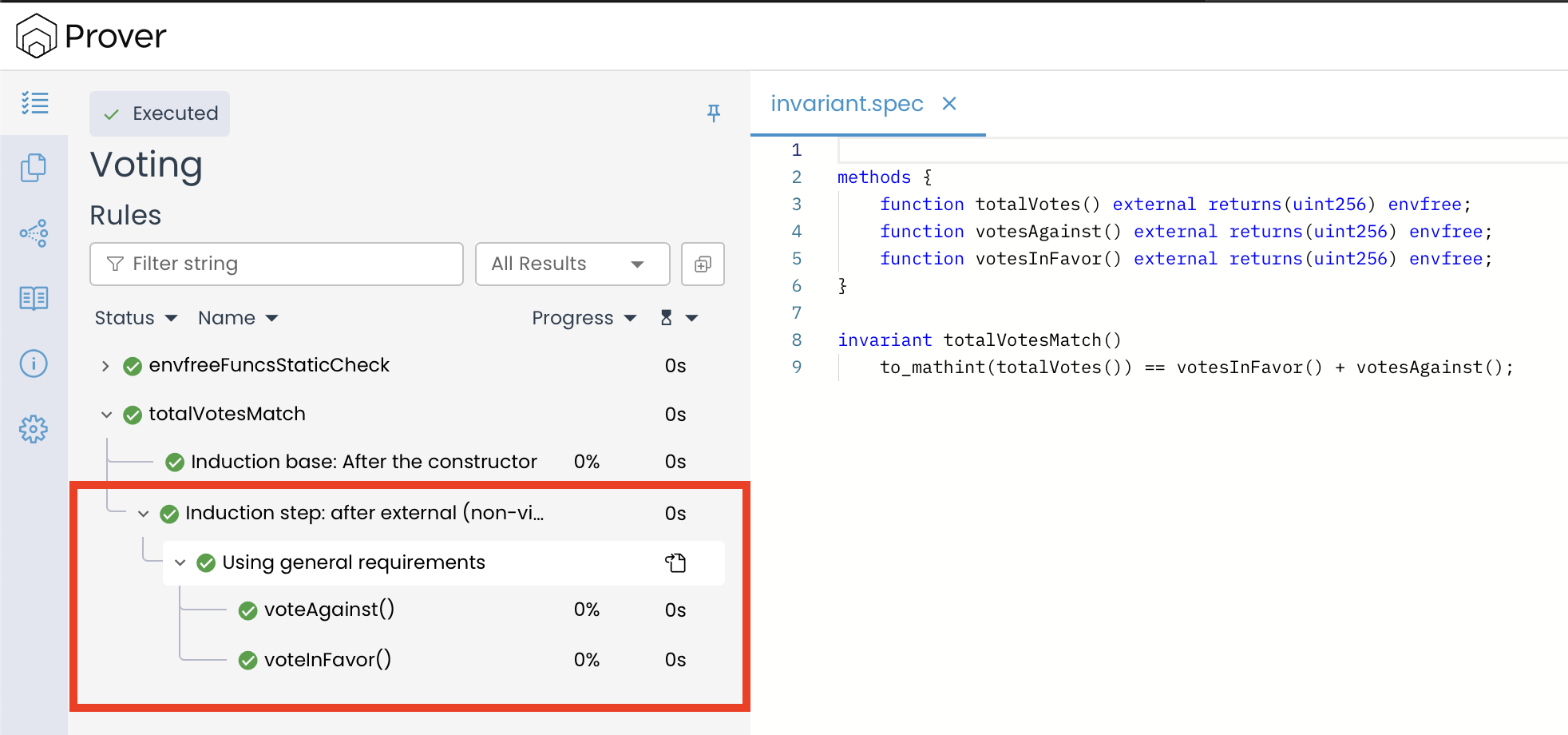
The result of both of these checks can be seen by expanding the invariant totalVotesMatch() in the left-hand panel of the Prover UI.
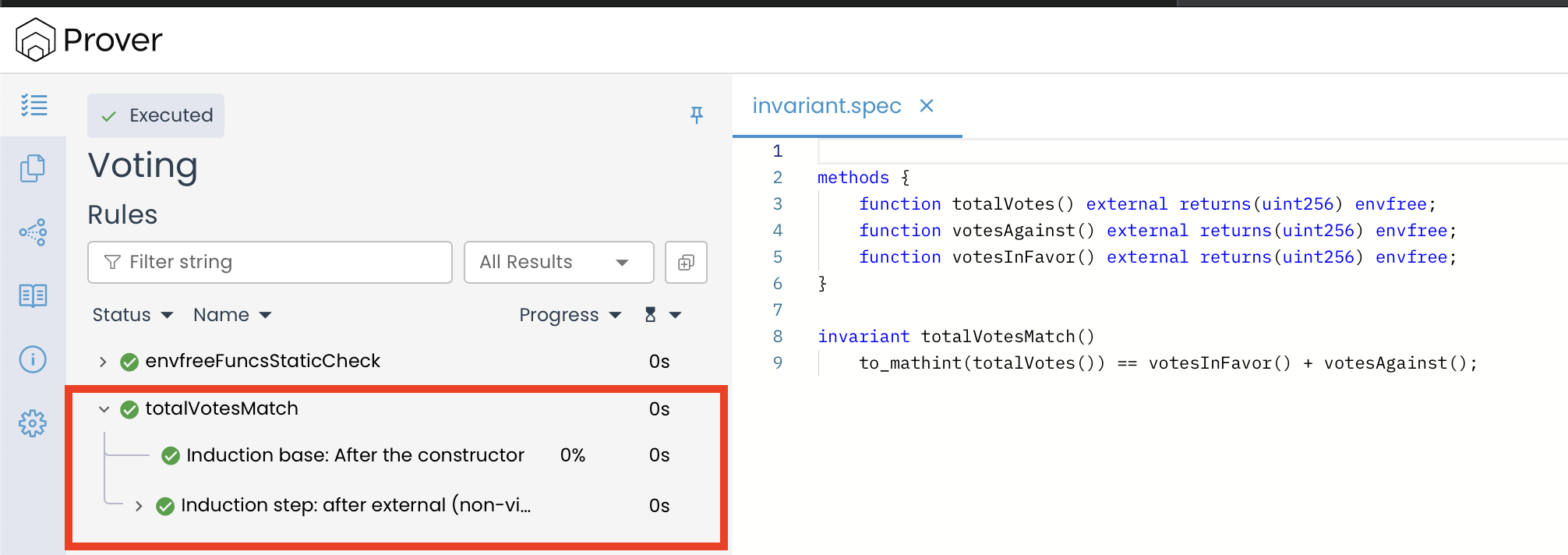
The outcome of the Initial-state check is displayed under “Induction base: After the constructor”, confirming that the contract begins in a valid state where the invariant holds.
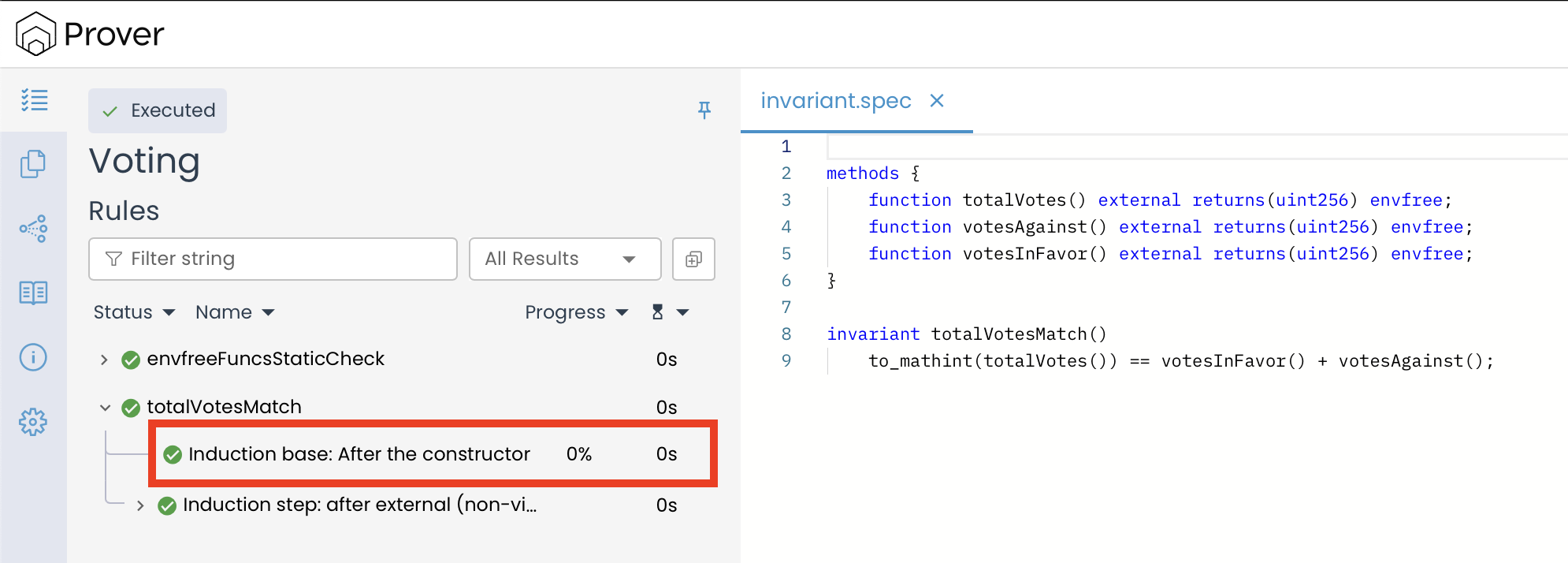
The outcome of the Inductive step is displayed under “Induction step: after external (non-view) methods”. This part of the proof is designed to show that all public and external functions preserve the invariant.
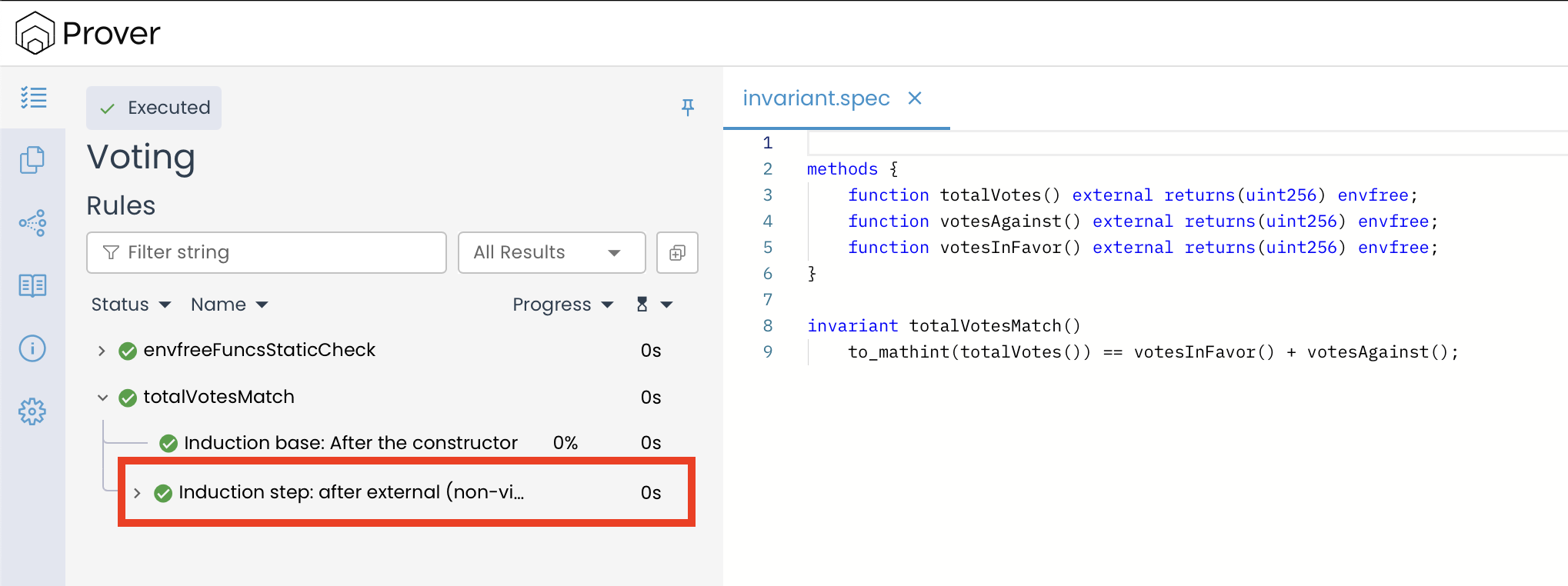
So, why does the report only show “non-view” (state changing) methods?
This is a clever optimization by the Prover. The Solidity compiler guarantees that view and pure functions do not change the contract’s state. The logic is as follows:
- We assume the invariant holds before any function call (the induction hypothesis).
- A view function is called.
- Since the contract’s state remains identical, the invariant must still hold after the call.
Because view and pure functions never change the contract’s state, there’s no need to verify them again during the inductive step. Their correctness is already ensured by the induction base check that confirms the contract starts in a valid state. Skipping these redundant checks helps the Prover to save verification resources and remove unnecessary clutter from the report.
The inductive step check, therefore, focuses on the methods that can change the state.
In our case, both voteAgainst() and voteInFavor() are analyzed under this check. The green checkmarks (✅) next to each function indicate that, when these methods are invoked, they do not violate the invariant. This confirms that the contract’s logic correctly preserves the invariant across all state-changing operations.
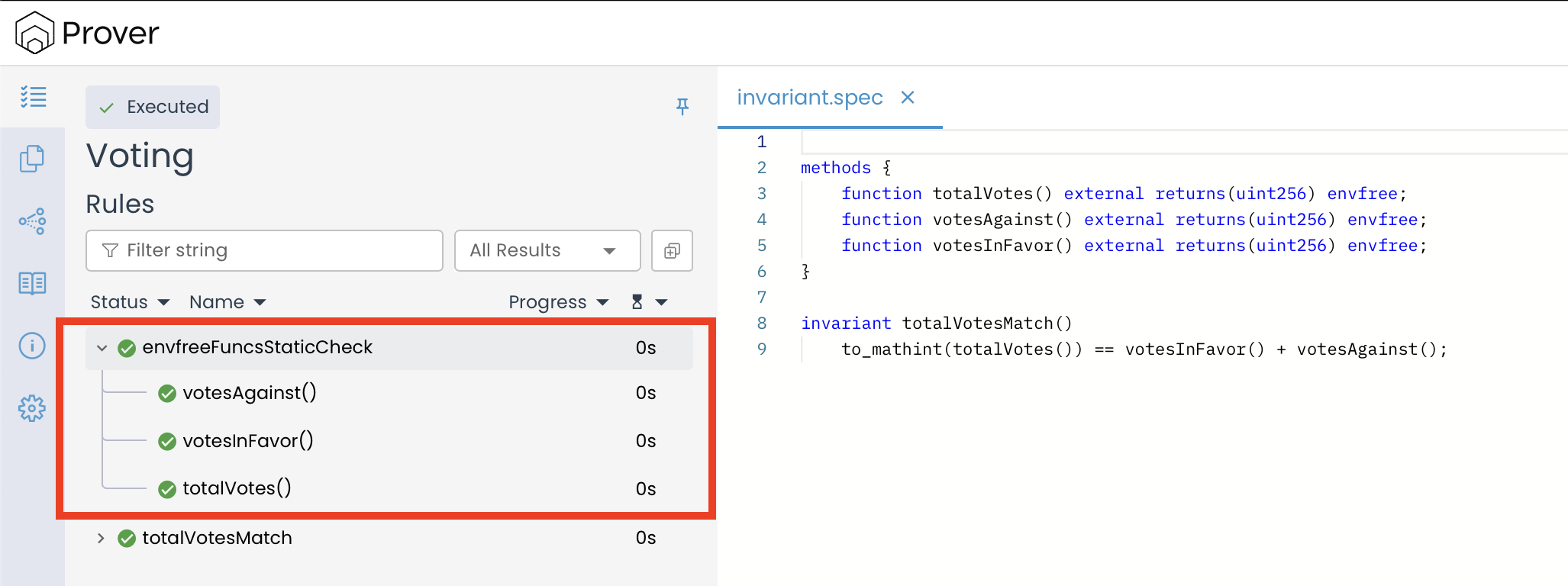
In addition to these two core checks, the Prover also runs a rule named envFreeFuncsStaticCheck, which verifies that all functions marked as envfree in the specification are truly independent of the execution environment like msg.sender or msg.value.
Understanding Additional Checks in the Prover UI
If you are using a newer version of the Certora Prover, you might notice additional entries when you expand an invariant result in the Prover UI, such as rule_not_vacuous and invariant_not_trivial_postcondition, as shown below:
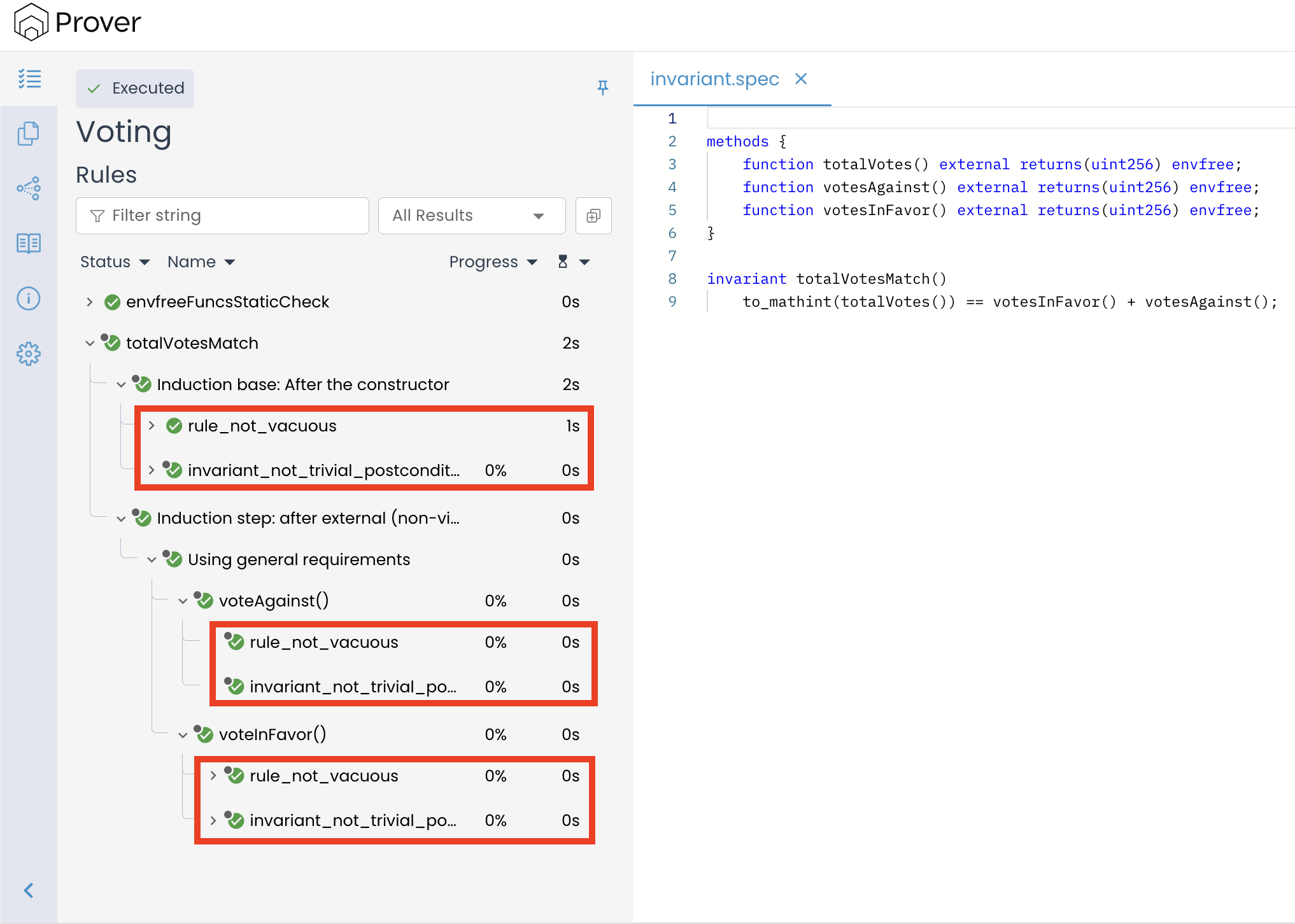
These extra entries are automatic sanity checks added by the Prover itself. They are not something you wrote, and they do not mean that additional invariants or rules are being verified. Their purpose is to ensure that your invariant is genuinely meaningful and not trivially satisfied.
Note: Starting from Certora Prover v8.1.0, basic sanity checks run by default (equivalent to setting "rule_sanity": "basic"). Previously, the default was "none". You can control this behavior using the --rule_sanity CLI option or by adding "rule_sanity": "none" to your configuration file to disable these checks. For a detailed explanation of all available sanity checks, see the Rule Sanity Checks documentation.
What these checks verify:
rule_not_vacuous: Confirms that the invariant is actually being evaluated under realistic conditions. A “vacuous” result would mean the invariant passes only because the preconditions are never met—essentially, it’s never truly tested.invariant_not_trivial_postcondition: Ensures that the invariant’s condition isn’t trivially true regardless of the contract’s state (e.g., an expression that always evaluates totrue).
These additional checks do not alter the core verification process. The Prover still performs the same two-part inductive proof: verifying that the invariant holds after the constructor (base case) and that every state-changing function preserves it (inductive step). The sanity checks simply provide extra confidence that your verification results are meaningful and not artifacts of specification errors.
Conclusion
Smart contract invariants are critical assertions about the state of your contract that must always remain true. Formally verifying these invariants ensures that the contract maintains its intended behavior and correctness across all possible states and method executions.
This article is part of a series on formal verification using the Certora Prover