In the last chapter, we saw that to perform formal verification using Certora Prover, we need to provide the Prover with the following key items:
- Smart Contract (.sol file)
- Specification (.spec file)
In this chapter, we will discuss what precisely a specification means and how to write one.
What is a Specification?
In Certora, a specification is a piece of code written in Certora Verification Language (CVL) that defines a set of rules that the contract under verification must hold or abide by.
A Certora specification or .spec file must have at least two components:
- One or more rules
- A Methods Block
There are other components, but for now, we’ll focus on these and introduce the rest as we use them.
Understanding the Rules
A rule defines the expected “before and after” behavior of a function call in the smart contract. It is defined using the rule keyword, followed by its name, as shown below:
rule nameOfRule{}
In CVL, a rule is written using the following three foundational concepts:
- Pre-conditional Requirement (optional): This specifies the conditions under which a rule should be evaluated by the Prover. It is specified using the
requirestatement. - Action: A method call that changes the contract state.
- Post-call Expectation: This part specifies the expected state of the contract after the action is executed. It is specified using the
assertstatement.
Note : We will discuss require and assert statements in much more detail in the next chapter.
To better understand the concepts discussed above, consider the Counter contract below.
// SPDX-License-Identifier: MIT
pragma solidity 0.8.25;
contract Counter {
uint256 public count;
// Increment the count
function increment() public {
count += 1;
}
// Decrement the count
function decrement() public {
count -= 1;
}
}
Now consider the rule below that is written to formally verify the increment() function of the Counter contract.
rule checkIncrementCall() {
// Precall Requirement
require count() == 0;
// Call OR Action
increment();
// Post-call Expectation
assert count() == 1;
}
In our checkIncrementCall() rule:
- The line
require count() == 0defines the pre-conditional requirement by instructing the Prover to consider this rule only when the initial value of thecountis zero. - The line
increment()performs a state transition by invoking theincrement()function on the contract. This represents the action being tested. - The line
assert count() == 1defines the post-call expectation, which specifies the expected state after the action. Here, it ensures that after callingincrement()on a counter that was initially set to zero, the counter’s value is updated to 1.
We need to put all three together because:
- Without an action, there is nothing to test, as the contract’s state remains unchanged.
- If we don’t include postcondition checks, we are not actually verifying anything. Assertions (
assertstatements) checks make sure that the contract’s state transitions align with our expectations. - Without the precondition, the rule might apply to unintended scenarios.
It is important to note that preconditions are optional. They should be used with caution, as they might exclude important scenarios that need to be verified.
Some rules can be implemented without any pre-conditional requirement****. For example, the rule below checks the integrity of our Counter contract by verifying that sequential calls to increment() and decrement() result in an unchanged count value.
rule checkCounter() {
//Retrieval of Pre-call value
uint256 precallCountValue = count();
// Call
increment();
decrement();
//Retrieval of Post-call value
uint256 postcallCountValue = count();
//Post-call Expectation
assert postcallCountValue == precallCountValue;
}
However, our specification file is still missing the methods block. Let’s add it before submitting it to the Prover for verification.
The Methods Block and its Use
The Methods Block contains a list of contract methods that the rules will call during verification. You can think of it like an interface or ABI in Solidity — it tells the Prover which functions exist, what they look like, and how they can be called. Certora’s version sometimes has a bit of extra syntax compared to plain Solidity.
The Methods Block is defined using the methods keyword, as shown below:
methods {
// Contract methods entries go here
}
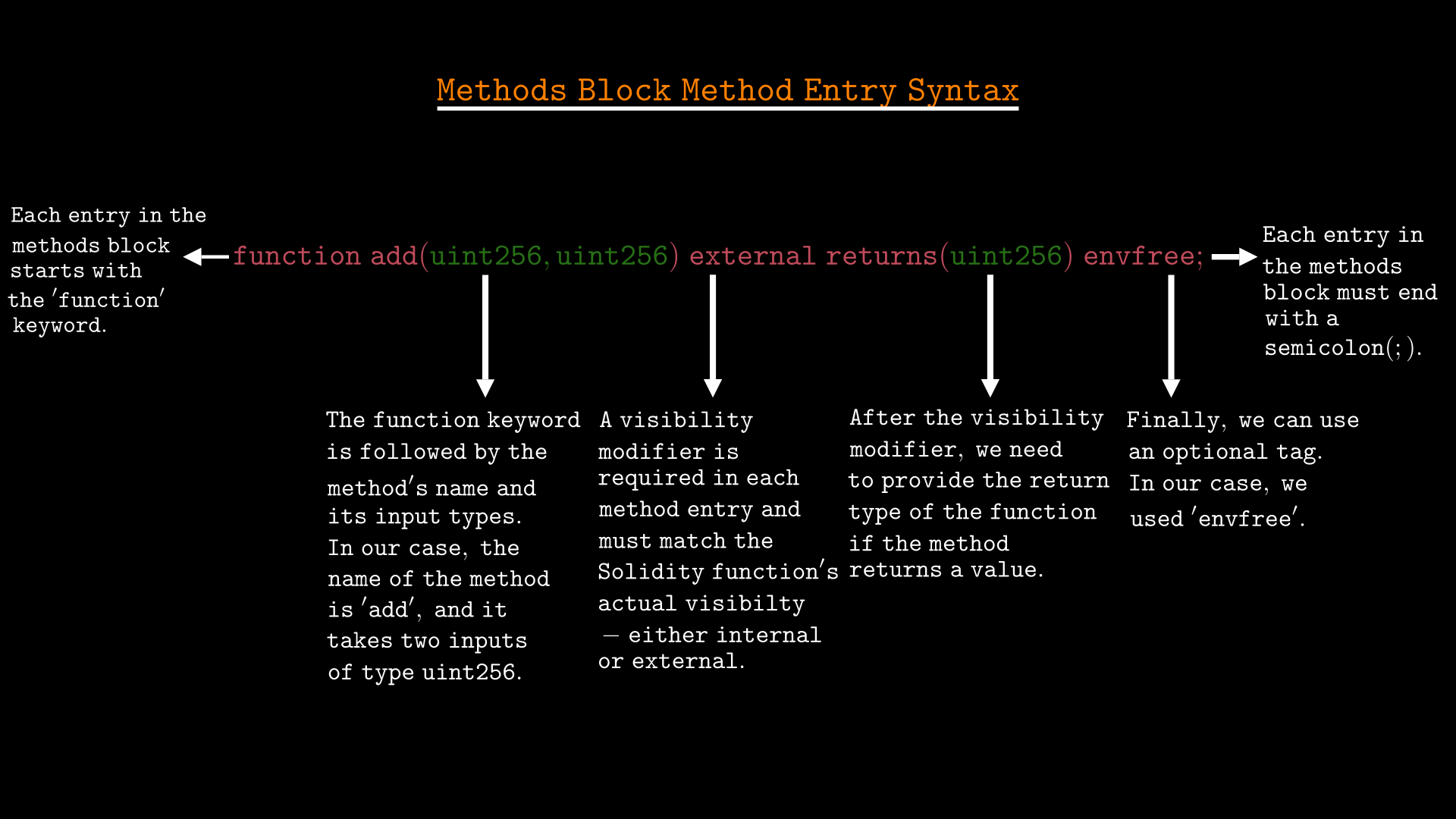
Each entry in the Methods Block should follow the syntax below:
- Each entry must start with the function keyword to define the method.
- Specify the method name exactly as it appears in the contract.
- List the input parameters inside parentheses, separating multiple inputs with commas. If the method does not take any inputs, leave the parentheses empty.
- Add a visibility modifier, which for our purposes should be
externalfor all methods. More advanced specifications may summarize internal functions, which we will cover later. - Use the
returnskeyword followed by the return type if the method returns a value. If there is no return value, this part is not needed. - Add an optional tag like
envfree(we will discuss other tags as we use them). - End each method declaration ends with a semicolon (;)
It is very important to note that adding functions to the methods block will not make verification faster or more effective unless those functions are marked as envfree, optional, or have a summary. If none of these conditions are met, adding the function will have no impact, and the verifier will likely issue a warning about it in the report.
To keep things simple and easy to understand, in this chapter we will only focus on envfree. We will explore optional and summarization in a separate chapter.
When to Use the envfree Tag?
A method in the Methods Block is declared envfree when its execution does not depend on Solidity’s global variables, such as msg.sender, block.number, or tx.origin.
For example, consider the add() function below:
function add(uint256 x, uint256 y) external returns (uint256) {
return x + y;
}
Since add() operates exclusively on its input parameters and does not need access to any global blockchain state like block.timestamp, msg.sender, msg.value or tx.origin for its execution, it means we can declare it as envfree in the Methods Block, as shown below:
methods {
add(uint256, uint256) external returns(uint256) envfree;
}
In contrast, some functions need access to the global blockchain state for its execution and therefore cannot be declared envfree. For instance, the balance() function below retrieves the caller’s balance :
function balance() external view returns(uint256) {
return balances[msg.sender];
}
Because balance() depends on msg.sender, it cannot be declared envfree. Below is how we should define it in the Methods Block:
methods {
balance() external returns(uint256);
}
Adding the Methods Block to Our spec
Since our rules (checkIncrementCall and checkCounter) make calls to the count(), increment(), and decrement() methods of the Counter contract, the Methods Block for our specification should list these functions, as shown below:
methods {
function count() external returns(uint256) envfree;
function increment() external envfree;
function decrement() external envfree;
}
None of these functions require access to Solidity’s global variables for their execution, so we marked them as envfree. If the contract has other functions that are not used in our specification, we don’t need to include them in the Methods Block.
Running the Verification
To verify the rules discussed above, follow the instructions below:
- Open a terminal and make sure you’re in the
certora-counterdirectory that we created in the last chapter. - Open the
certora-counterdirectory in VS Code or any other code editor of your choice. - Create two empty files:
Counter2.solinside thecontractssubdirectory andcounter-2.specinside thespecssubdirectory. - Copy and paste the smart contract below into
Counter2.sol.
// SPDX-License-Identifier: MIT
pragma solidity 0.8.25;
contract Counter {
uint256 public count;
// Increment the count
function increment() public {
count += 1;
}
// Decrement the count
function decrement() public {
count -= 1;
}
}
- Copy and paste the specification below into
counter-2.spec.
methods {
function count() external returns(uint256) envfree;
function increment() external envfree;
function decrement() external envfree;
}
rule checkIncrementCall() {
//Precall Requirement
require count() == 0;
// Call OR Action
increment();
// Post-call Expectation
assert count() == 1;
}
rule checkCounter() {
//Retrieval of Pre-call value
uint256 precallCountValue = count();
// Call
increment();
decrement();
//Retrieval of Post-call value
uint256 postcallCountValue = count();
//Post-call Expectation
assert postcallCountValue == precallCountValue;
}
- Activate the Python virtual environment by running the command below in your terminal:
source certora-env/bin/activate
- Load the Certora access key as an environment variable in your terminal:
source .profile # For Bash
# OR
source .zshenv # For Zsh
- Set the correct Solidity compiler version by running the command below:
solc-select use 0.8.25
- Finally, submit the specification and contract to the Prover for verification by running the following command:
certoraRun contracts/Counter2.sol:Counter --verify Counter:specs/counter-2.spec
Understanding the Verification Result
If the Prover successfully compiles the code without errors, it will print the verification results link in your terminal.
To view the verification results, open the link printed in your terminal using a browser. The results should look similar to the image below:
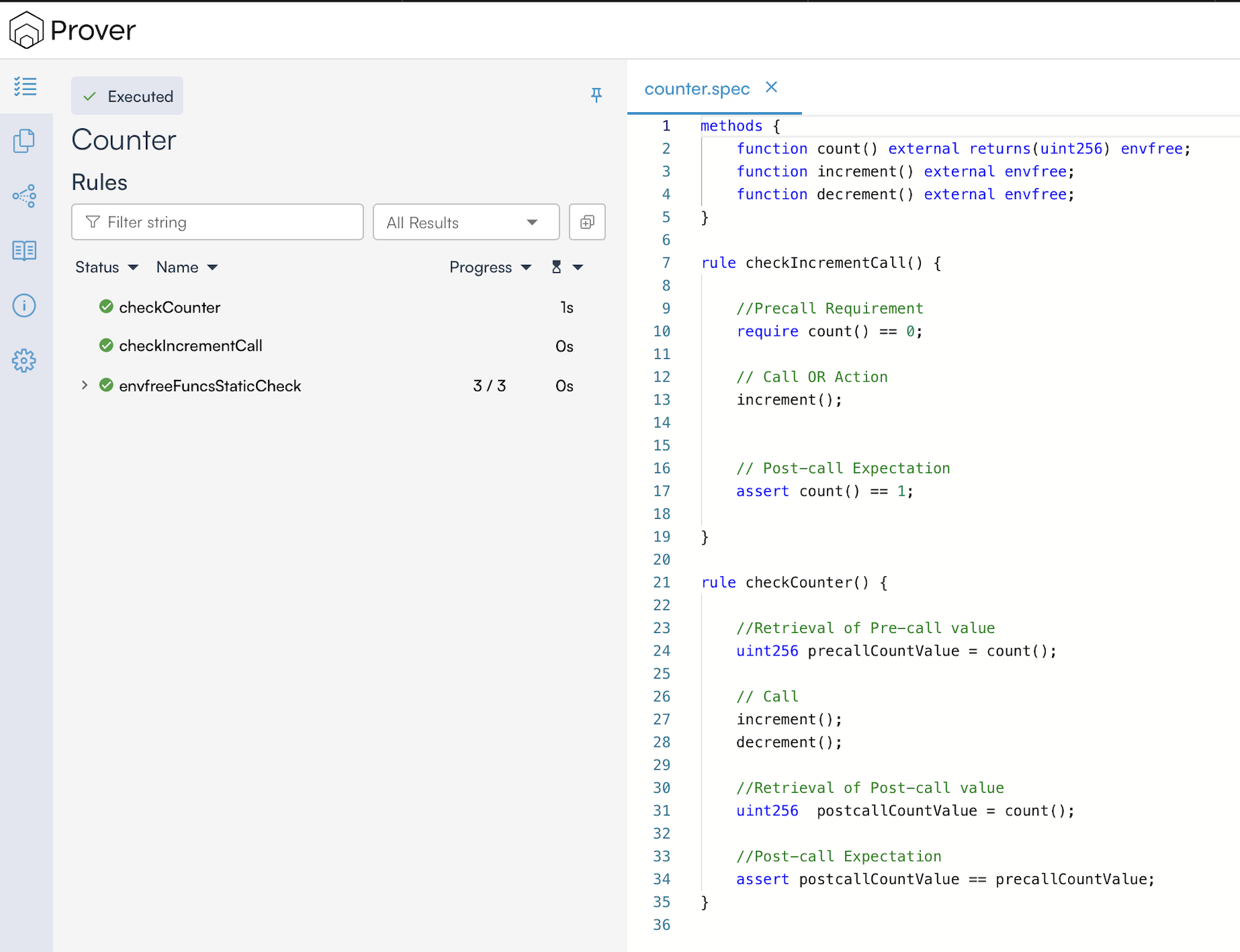
In our case, it shows the results for three rules:
checkCounter: This shows the verification results for thecheckCounterrule from our spec.checkIncrementCall: This shows the verification results for thecheckIncrementCallrule from our spec.envfreeFuncsStaticCheck: When the Methods Block contains functions marked asenvfree, the Prover verifies that they do not rely on Solidity’s global variables. The results of this verification are published asenvfreeFuncsStaticCheck.
The green check mark (✅) indicates that the Prover has not found any violations, meaning our rules have been successfully verified. In case of a violation, a red cross mark (❌) will be displayed.
Even though all the rules are verified, this does not mean the entire contract is bug-free. There could be other parts of the code that have bugs. It could also be the case that our spec doesn’t capture all our expectations. For example, we didn’t specify what should happen if we call decrement() when the counter is at 0. In the following chapters, we will show how to express more complex rules than the one we discussed here.
Conclusion
In this chapter, we explored the anatomy of a .spec file, focusing on the Methods Block for interface definition and the Rule Block for logic testing. We also saw how tags like envfree help refine the verification process. In the next chapter, we will build on this foundation by taking a detailed look at require and assert statements.
This article is part of a series on formal verification using the Certora Prover