In the previous lessons, we explored individual building blocks of Rust canister development—state management, query and update methods, access control, and caller-based authorization. While each concept works in isolation, real-world canisters require these pieces to work together in a coherent design. In this tutorial, we bring those ideas together by building a simple fungible token canister from scratch.
If you’re familiar with Ethereum, you can think of this canister as the ICP analogue of an ERC-20 token. However, while the high-level concepts—balances, transfers, approvals, and delegated spending—remain familiar, their implementation on ICP differs in important ways.
On the Internet Computer, token interfaces are standardized through the ICRC (Internet Computer Request for Comments) specifications. In particular:
- ICRC-1 defines the core fungible token functionality, such as balances and transfers.
- ICRC-2 extends this model with the approval and transfer_from pattern for delegated transfers.
Throughout this tutorial, we will implement the essential functionality covered by these two standards, using Rust and the IC canister programming model.
Specifically, our token canister will support:
Token metadata
name()symbol()
Core token logic
mint()totalSupply()balanceOf()transfer()
Allowance and delegation
allowance()approve()transferFrom()
To kick-start things, create a new dfx project called token_canister by running the following command in your terminal:
dfx new token_canister --type rust --no-frontend
Open the project, clear the contents of lib.rs.
Writing the Token Metadata
Token metadata refers to the basic, human-readable information that identifies a token. Metadata defines what the token is from a user’s perspective. Wallets, dashboards, and explorers rely on this information to display tokens in a meaningful way.
At a minimum, token metadata includes:
• the token’s name, and
• the token’s symbol.
These values do not affect the token’s accounting logic, but they are essential for usability and recognition.
To add metadata for our token, within the thread-local storage, define the token’s NAME and SYMBOL string variables, as shown below:
use std::cell::RefCell;
thread_local!{
// **** NEW CODE HERE ****
static NAME : RefCell<String> = RefCell::new(String::new());
static SYMBOL : RefCell<String> = RefCell::new(String::new());
}
ic_cdk::export_candid!();
To make these variables queryable, add a query function for both the NAME and SYMBOL: name() and symbol() respectively.
use std::cell::RefCell;
thread_local! {
static NAME : RefCell<String> = RefCell::new(String::new());
static SYMBOL : RefCell<String> = RefCell::new(String::new());
}
// **** NEW CODE HERE ****
#[ic_cdk::query]
fn name() -> String {
NAME.with_borrow(|cell| cell.clone())
}
#[ic_cdk::query]
fn symbol() -> String {
SYMBOL.with_borrow(|cell| cell.clone())
}
ic_cdk::export_candid!();
Both NAME and SYMBOL’s value will be initialized when the canister is first deployed. To handle this, define an init() function and mark it with the #[ic_cdk::init] attribute; this function will initialize NAME, SYMBOL, and any other state variables that are needed.
use std::cell::RefCell;
thread_local! {
static NAME : RefCell<String> = RefCell::new(String::new());
static SYMBOL : RefCell<String> = RefCell::new(String::new());
}
// **** NEW CODE HERE ****
#[ic_cdk::init]
fn init(name: String, symbol: String) {
NAME.with_borrow_mut(|cell| *cell = name);
SYMBOL.with_borrow_mut(|cell| *cell = symbol);
}
#[ic_cdk::query]
fn name() -> String {
NAME.with_borrow(|cell| cell.clone())
}
#[ic_cdk::query]
fn symbol() -> String {
SYMBOL.with_borrow(|cell| cell.clone())
}
ic_cdk::export_candid!();
Building the Core Token Logic
With the token’s identity in place, we can now focus on implementing its core logic.
The core token logic defines how tokens are created, how ownership is tracked, and how tokens move between principals. This includes balance accounting, total supply management, minting, and direct transfers.
In this section, we’ll build these pieces incrementally, starting with the accounting state that records who owns how many tokens, and then layering on the operations that modify that state.
Adding the Accounting State (Balances and Total Supply)
To account for the amount of tokens each address owns, we will track them through a HashMap data structure. It will map a Principal type (address of a canister or user) to a u128 number (amount of tokens they own):
static BALANCES : RefCell<HashMap<Principal, u128>> = RefCell::new(HashMap::new());
Insert BALANCES into the thread-local storage and add the use statement for the Principal type:
use std::cell::RefCell;
use std::collections::HashMap;
// **** NEW CODE HERE ****
use candid::Principal;
thread_local! {
static NAME : RefCell<String> = RefCell::new(String::new());
static SYMBOL : RefCell<String> = RefCell::new(String::new());
// **** NEW CODE HERE ****
static BALANCES : RefCell<HashMap<Principal, u128>> = RefCell::new(HashMap::new());
}
#[ic_cdk::init]
fn init(name: String, symbol: String) {
NAME.with_borrow_mut(|cell| *cell = name);
SYMBOL.with_borrow_mut(|cell| *cell = symbol);
}
#[ic_cdk::query]
fn name() -> String {
NAME.with_borrow(|cell| cell.clone())
}
#[ic_cdk::query]
fn symbol() -> String {
SYMBOL.with_borrow(|cell| cell.clone())
}
ic_cdk::export_candid!();
Create a query function to retrieve the token balance for a given principal. We’ll name it balance_of():
use std::{cell::RefCell, collections::HashMap};
use candid::Principal;
thread_local! {
static NAME : RefCell<String> = RefCell::new(String::new());
static SYMBOL : RefCell<String> = RefCell::new(String::new());
// **** NEW CODE HERE ****
static BALANCES : RefCell<HashMap<Principal, u128>> = RefCell::new(HashMap::new());
}
#[ic_cdk::init]
fn init(name: String, symbol: String) {
NAME.with_borrow_mut(|cell| *cell = name);
SYMBOL.with_borrow_mut(|cell| *cell = symbol);
}
#[ic_cdk::query]
fn name() -> String {
NAME.with_borrow(|cell| cell.clone())
}
#[ic_cdk::query]
fn symbol() -> String {
SYMBOL.with_borrow(|cell| cell.clone())
}
// **** NEW CODE HERE ****
#[ic_cdk::query]
fn balance_of(principal: Principal) -> u128 {
BALANCES.with_borrow(|cell| *cell.get(&principal).unwrap_or(&0))
}
ic_cdk::export_candid!();
TOTAL_SUPPLY Tracks The Tokens in Circulation
The TOTAL_SUPPLY variable will keep track of the cumulative tokens minted. The minting and transfer function will be introduced in following section.
Add the TOTAL_SUPPLY variable into your thread local storage.
use std::{cell::RefCell, collections::HashMap};
use candid::Principal;
thread_local! {
static NAME : RefCell<String> = RefCell::new(String::new());
static SYMBOL : RefCell<String> = RefCell::new(String::new());
static BALANCES : RefCell<HashMap<Principal, u128>> = RefCell::new(HashMap::new());
// **** NEW CODE HERE ****
static TOTAL_SUPPLY: RefCell<u128> = RefCell::new(0);
}
#[ic_cdk::init]
fn init(name: String, symbol: String) {
NAME.with_borrow_mut(|cell| *cell = name);
SYMBOL.with_borrow_mut(|cell| *cell = symbol);
}
#[ic_cdk::query]
fn name() -> String {
NAME.with_borrow(|cell| cell.clone())
}
#[ic_cdk::query]
fn symbol() -> String {
SYMBOL.with_borrow(|cell| cell.clone())
}
#[ic_cdk::query]
fn balance_of(principal: Principal) -> u128 {
BALANCES.with_borrow(|cell| *cell.get(&principal).unwrap_or(&0))
}
ic_cdk::export_candid!();
To retrieve the token’s total supply, add the query function total_supply():
use std::{cell::RefCell, collections::HashMap};
use candid::Principal;
thread_local! {
static NAME : RefCell<String> = RefCell::new(String::new());
static SYMBOL : RefCell<String> = RefCell::new(String::new());
static BALANCES : RefCell<HashMap<Principal, u128>> = RefCell::new(HashMap::new());
static TOTAL_SUPPLY: RefCell<u128> = RefCell::new(0);
}
#[ic_cdk::init]
fn init(name: String, symbol: String) {
NAME.with_borrow_mut(|cell| *cell = name);
SYMBOL.with_borrow_mut(|cell| *cell = symbol);
}
#[ic_cdk::query]
fn name() -> String {
NAME.with_borrow(|cell| cell.clone())
}
#[ic_cdk::query]
fn symbol() -> String {
SYMBOL.with_borrow(|cell| cell.clone())
}
#[ic_cdk::query]
fn balance_of(principal: Principal) -> u128 {
BALANCES.with_borrow(|cell| *cell.get(&principal).unwrap_or(&0))
}
// **** NEW CODE HERE ****
#[ic_cdk::query]
fn total_supply() -> u128 {
TOTAL_SUPPLY.with_borrow(|cell| *cell)
}
ic_cdk::export_candid!();
With the balance and total supply logic in place, we are now ready to mint tokens into existence.
Building the Mint Functionality
For this token implementation, we restrict minting to the contract owner, which is set to the deployer.
To implement this logic, we need to define an OWNER state variable, initialize it during canister deployment, and use it to enforce access control inside the mint function.
Defining the OWNER Variable
Add an OWNER variable and have its value initialize through the constructor.
use std::{cell::RefCell, collections::HashMap};
use candid::Principal;
use ic_cdk::api::msg_caller;
thread_local! {
static NAME : RefCell<String> = RefCell::new(String::new());
static SYMBOL : RefCell<String> = RefCell::new(String::new());
static BALANCES : RefCell<HashMap<Principal, u128>> = RefCell::new(HashMap::new());
static TOTAL_SUPPLY: RefCell<u128> = RefCell::new(0);
// **** NEW CODE HERE ****
static OWNER : RefCell<Principal> = RefCell::new(Principal::anonymous());
}
#[ic_cdk::init]
fn init(name: String, symbol: String) {
NAME.with_borrow_mut(|cell| *cell = name);
SYMBOL.with_borrow_mut(|cell| *cell = symbol);
// **** NEW CODE HERE ****
OWNER.with_borrow_mut(|cell| *cell = msg_caller());
}
#[ic_cdk::query]
fn name() -> String {
NAME.with_borrow(|cell| cell.clone())
}
#[ic_cdk::query]
fn symbol() -> String {
SYMBOL.with_borrow(|cell| cell.clone())
}
#[ic_cdk::query]
fn balance_of(principal: Principal) -> u128 {
BALANCES.with_borrow(|cell| *cell.get(&principal).unwrap_or(&0))
}
#[ic_cdk::query]
fn total_supply() -> u128 {
TOTAL_SUPPLY.with_borrow(|cell| *cell)
}
ic_cdk::export_candid!();
Add an owner() query function that returns the owner’s Principal:
use std::{cell::RefCell, collections::HashMap};
use candid::Principal;
use ic_cdk::api::msg_caller;
thread_local! {
static NAME : RefCell<String> = RefCell::new(String::new());
static SYMBOL : RefCell<String> = RefCell::new(String::new());
static BALANCES : RefCell<HashMap<Principal, u128>> = RefCell::new(HashMap::new());
static TOTAL_SUPPLY: RefCell<u128> = RefCell::new(0);
static OWNER : RefCell<Principal> = RefCell::new(Principal::anonymous());
}
#[ic_cdk::init]
fn init(name: String, symbol: String) {
NAME.with_borrow_mut(|cell| *cell = name);
SYMBOL.with_borrow_mut(|cell| *cell = symbol);
OWNER.with_borrow_mut(|cell| *cell = msg_caller());
}
#[ic_cdk::query]
fn name() -> String {
NAME.with_borrow(|cell| cell.clone())
}
#[ic_cdk::query]
fn symbol() -> String {
SYMBOL.with_borrow(|cell| cell.clone())
}
#[ic_cdk::query]
fn balance_of(principal: Principal) -> u128 {
BALANCES.with_borrow(|cell| *cell.get(&principal).unwrap_or(&0))
}
#[ic_cdk::query]
fn total_supply() -> u128 {
TOTAL_SUPPLY.with_borrow(|cell| *cell)
}
// **** NEW CODE HERE ****
#[ic_cdk::query]
fn owner() -> Principal {
OWNER.with_borrow(|cell| *cell)
}
ic_cdk::export_candid!();
Only owner can mint() Function
The mint() function creates new tokens into circulation and assigns them to a specified account. To prevent unauthorized minting, we’ll add access control so that only the contract owner can call this function.
When mint() is executed, it
- Increases the recipient’s balance and
- updates the total supply to account for the newly created tokens.
mint() returns a Result. Prior to our usage of boolean to return values, we’ll use the Result type to add a variation of return values.
Add the mint() function below into lib.rs, detailed code explanations are provided after.
// previous codes
// **** NEW CODE HERE ****
#[ic_cdk::update]
fn mint(to: Principal, amount: u128) -> Result<String, String> {
// access control - early return if not owner
if !OWNER.with_borrow(|owner| *owner == msg_caller()) {
return Err("Only owner can mint".to_string());
}
// credit new tokens to the mintee
BALANCES.with_borrow_mut(|map| {
*map.entry(to).or_insert(0) += amount;
});
// increment total supply
TOTAL_SUPPLY.with_borrow_mut(|supply| *supply += amount);
return Ok(format!("Minted {amount} tokens to {to}"));
}
ic_cdk::export_candid!();
The mint() function accepts two arguments: the recipient’s principal and the amount to mint. Its logic is as follows:
- Authorization check: it verifies that whether
msg_caller()is the contract owner or not and returns an Err immediately if the caller is not an owner. - State updates: If
msg_caller()is the owner, the function credits the recipient’s balance by the minted amount—creating a new balance entry if one does not already exist—and increments the total token supply accordingly.
Adding The transfer() Functionality
Token holders should be able to transfer tokens to other principals. The transfer(to, amount) function enables this by deducting the specified amount from the caller’s balance and crediting the same amount to the recipient’s balance.
Add the transfer() function shown below to your canister code.
// Earlier Codes ... (Code Example Too long)
// **** NEW CODE HERE ****
#[ic_cdk::update]
fn transfer(to: Principal, amount: u128) -> bool {
BALANCES.with_borrow_mut(|map| {
// get caller's principal
let from = msg_caller();
// get caller's balance
let from_bal = *map.get(&from).unwrap_or(&0);
// check if balance is enough
if from_bal < amount {
// return false if they do not have enough
return false;
}
//
*map.entry(from).or_insert(0) -= amount;
*map.entry(to).or_insert(0) += amount;
true
})
}
ic_cdk::export_candid!();
The transfer() function follows this execution flow:
- Retrieves the caller’s current balance, defaulting to
0if no entry exists. - Returns
falseif the caller’s balance is insufficient for the transfer. - Deducts the transfer amount from the caller’s balance and adds it to the recipient’s balance in the same operation.
Building the Allowance and Delegation Mechanism
ICRC-1 defines the core token functionality, including balance tracking and direct transfers between principals. However, direct transfers only allow a token owner to move their own tokens.
To support delegated transfers—where one principal is allowed to transfer tokens on behalf of another—ICRC-2 extends this model with the approve and transfer_from pattern. This mechanism is commonly used by applications such as exchanges and payment processors.
Allowance and Delegated Transfers
To implement delegated transfers, we introduce an ALLOWANCE state variable that tracks how many tokens an owner has approved a spender to use. We represent this as a nested HashMap, where the first key is the token owner, the second key is the approved spender, and the value represents the approved amount.
// Earlier Codes ... (Code Example Too long)
thread_local! {
static NAME : RefCell<String> = RefCell::new(String::new());
static SYMBOL : RefCell<String> = RefCell::new(String::new());
static BALANCES : RefCell<HashMap<Principal, u128>> = RefCell::new(HashMap::new());
static TOTAL_SUPPLY: RefCell<u128> = RefCell::new(0);
static OWNER : RefCell<Principal> = RefCell::new(Principal::anonymous());
// **** NEW CODE HERE ****
static ALLOWANCE: RefCell<HashMap<Principal, HashMap<Principal, u128>>> =
RefCell::new(HashMap::new());
// Solidity equivalent of allowance[owner][spender] = amount
}
// ...
Implementing approve() for Delegated Transfers
With the allowance data structure in place, we can now allow token owners to delegate transfer authority to other principals. This is done through the approve() function.
The approve() function lets a token owner grant a spender permission to transfer up to a specified amount of tokens on their behalf. Internally, it updates the ALLOWANCE mapping by recording how many tokens the spender is allowed to use.
Add the code for the approve() function shown below to your canister:
// Earlier Codes ...
// **** NEW CODE HERE ****
#[ic_cdk::update]
fn approve(spender: Principal, amount: u128) {
// Token owner = caller
let owner = msg_caller();
// Add allowance to spender
ALLOWANCE.with_borrow_mut(|cell| {
// First mapping: Establishes a relationship between Owner and Spender
let owner_allowances = cell.entry(owner).or_default();
// Second mapping: Sets the amount the Spender can transfer
owner_allowances.insert(spender, amount);
});
}
Once an approval is recorded, both the token owner and the spender need a way to verify how much allowance is available. To support this, we add a query method that reads from the ALLOWANCE mapping.
Checking a Spender’s Allowance: allowance()
The allowance() function reads the nested ALLOWANCE mapping and returns the amount a spender is currently authorized to transfer on behalf of an owner.
// Earlier Codes ...
// **** NEW CODE HERE ****
#[ic_cdk::query]
fn allowance(owner: Principal, spender: Principal) -> u128 {
ALLOWANCE.with_borrow(|cell| {
// Checks for a owner spender relationship
let Some(inner) = cell.get(&owner) else {
// If there is no relationship, then return zero
return 0;
};
// If the there is an entry, check the allowance for spender
*inner.get(&spender).unwrap_or(&0)
})
}
How the allowance() function works:
- The function checks whether the owner has an entry in the
ALLOWANCEmapping. If no entry exists, the owner has never approved the spender, and the function immediately returns 0. - If an entry exists for the owner, the function looks up the spender’s allowance and returns the approved amount, defaulting to 0 if no specific entry is found.
Reading the allowance tells us how much a spender is authorized to use, but it does not actually move any tokens. To complete the delegation workflow, we need a way for an approved spender to act on that authorization and transfer tokens on the owner’s behalf.
Transferring Delegated Tokens: transfer_from()
The transfer_from() function allows an approved spender to transfer tokens from the owner (from) to a recipient (to). It performs the following steps:
- Verifies that
msg_caller()(the spender) has been granted an allowance by the owner and returns false immediately if no allowance exists. - Checks whether the requested transfer amount exceeds the approved allowance and returns false if it does.
- Ensures the owner has a sufficient balance to cover the transfer.
- If all checks pass, debits the owner’s balance and credits the recipient’s balance.
- Finally, reduces the spender’s remaining allowance by the transferred amount.
Add the code for the transfrom() function shown below to our canister:
// Earlier Codes ...
// **** NEW CODE HERE ****
#[ic_cdk::update]
fn transfer_from(from: Principal, to: Principal, amount: u128) -> bool {
let spender = msg_caller();
// check allowance
let allowed = ALLOWANCE.with_borrow(|cell| {
cell.get(&from)
.and_then(|inner| inner.get(&spender).copied())
.unwrap_or(0)
});
if allowed < amount {
return false;
}
// check balance
let from_bal = BALANCES.with(|cell| {
let map = cell.borrow();
map.get(&from).copied().unwrap_or(0)
});
// return false early
if from_bal < amount {
return false;
}
// update balances
BALANCES.with(|cell| {
let mut map = cell.borrow_mut();
// debit `from`
map.insert(from, from_bal - amount);
// credit `to`
let to_bal = map.get(&to).copied().unwrap_or(0);
map.insert(to, to_bal + amount);
});
// consume allowance (and optionally tidy zeros)
ALLOWANCE.with(|cell| {
let mut outer = cell.borrow_mut();
if let Some(inner) = outer.get_mut(&from) {
let entry = inner.entry(spender).or_insert(0);
*entry -= amount; // safe due to allowed >= amount
if *entry == 0 {
inner.remove(&spender);
}
if inner.is_empty() {
outer.remove(&from);
}
}
});
true
}
Deploying the Token Canister
First, deploy the token_canister using the default dfx identity. Since the canister owner is set to the deployer, this identity will act as the token owner for our tests.
dfx deploy
When prompted, pass “RareSkills” as the token name and “RS” as the symbol.
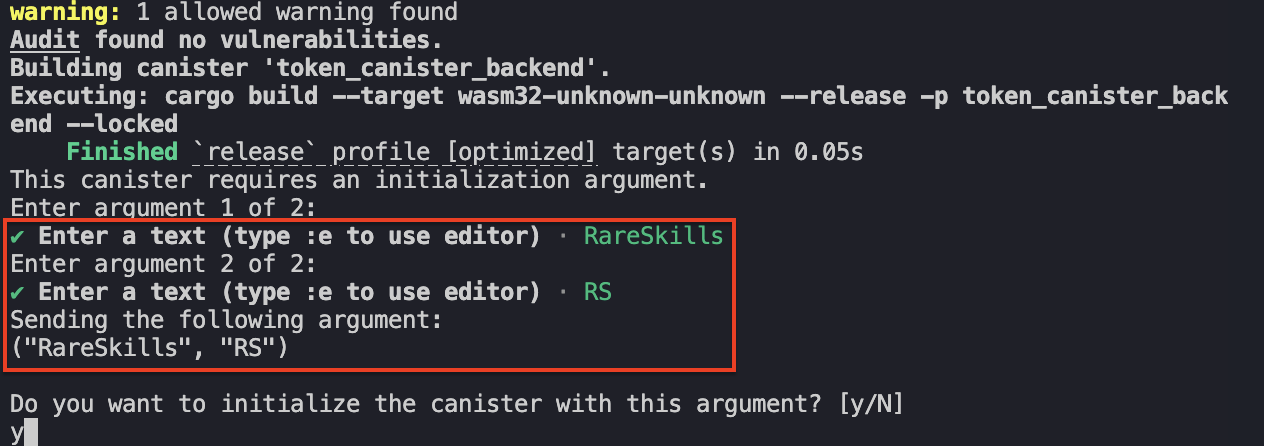
We haven’t minted any tokens yet, to make it interesting let’s mint tokens to a new Principal, Alice.
Simulating Multiple Users with dfx Identities
To create a new private-public key pair in dfx, use the command below:
dfx identity new <Identity_Name>
As an example, replace <Identity_Name> with Alice. Run.
dfx identity new Alice
Although we’ve created a new identity, Alice has not been configured by dfx to be used. We can confirm it by running.
dfx identity whoami
dfx should still be using the default generated identity.
To use Alice, run the command below
dfx identity use Alice
Then check that dfx is using Alice with the dfx identity whoami command.
Alice’s principal or address on each of your developer environment should be different from this example’s. As an example we’ll associate Alice to this principal: p67cs-wteuw-2m25n-457nx-dxwq7-uk36c-qlodh-nh5dw-uhzx4-ga6k3-yae.
We can create as many identities as needed. The default Identity should have the name default. View the list of dfx identities using:
dfx identity list
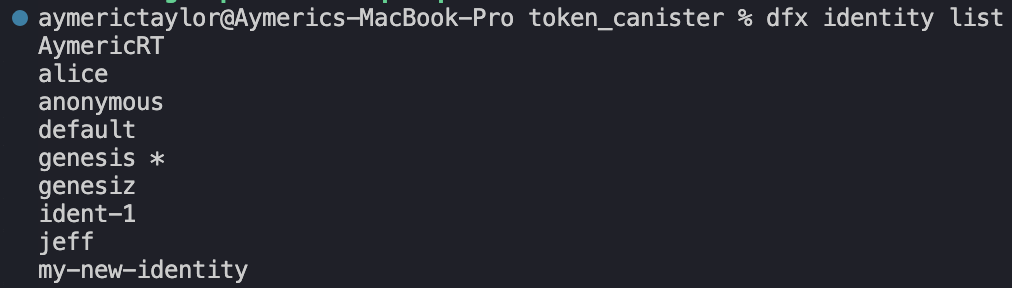
To get the principal of any identity, use the command below:
dfx identity get-principal
Mint RareSkills Tokens
With roles established, we begin by minting tokens. Since minting is restricted to the owner, switch back to the default identity and mint tokens to Alice’s principal
Switch back to default identity and call the mint() function.
dfx canister call token_canister_backend mint
dfx would prompt you to pass the to : Principal and amount : u128.
We’ll mint 1000 RareSkills Tokens to Alice, therefore pass p67cs-wteuw-2m25n-457nx-dxwq7-uk36c-qlodh-nh5dw-uhzx4-ga6k3-yae (use your Alice Identities principal, this is an example) and 1000.
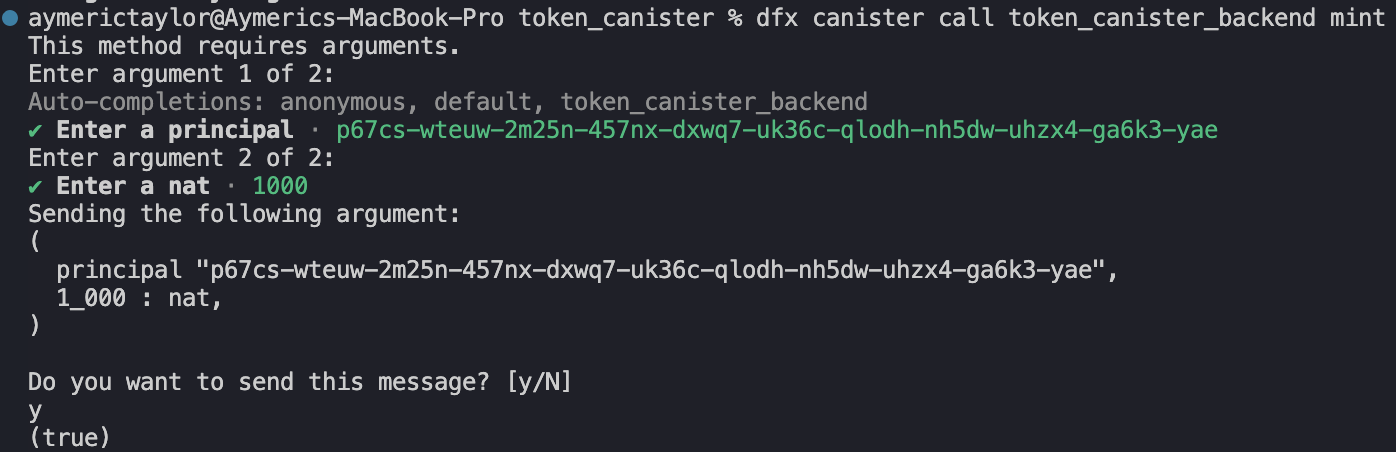
Call the balance_of() function to verify Alice’s balance.
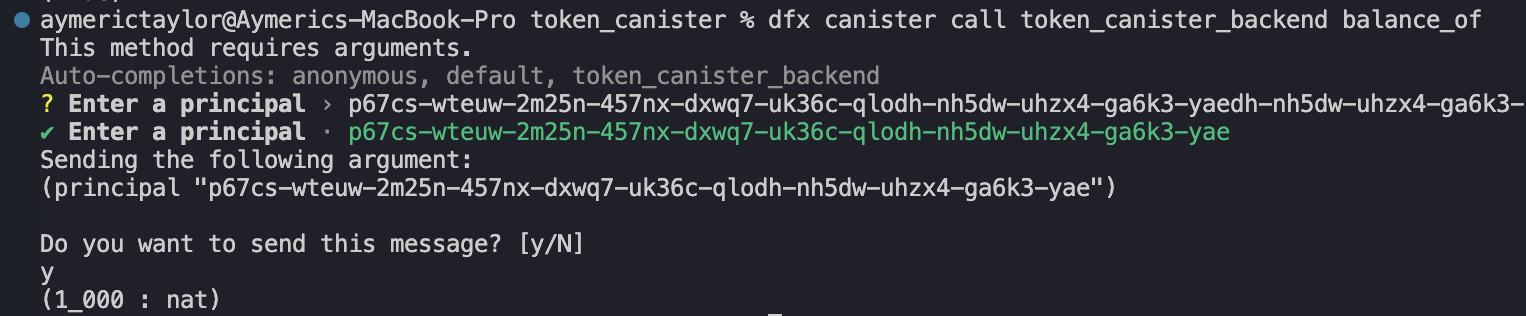
Transfer RareSkills Tokens
Switch to Alice identity and transfer 250 tokens to this address : hpikg-6exdt-jn33w-ndty3-fc7jc-tl2lr-buih3-cs3y7-tftkp-sfp62-gqe.
dfx canister call token_canister_backend transfer
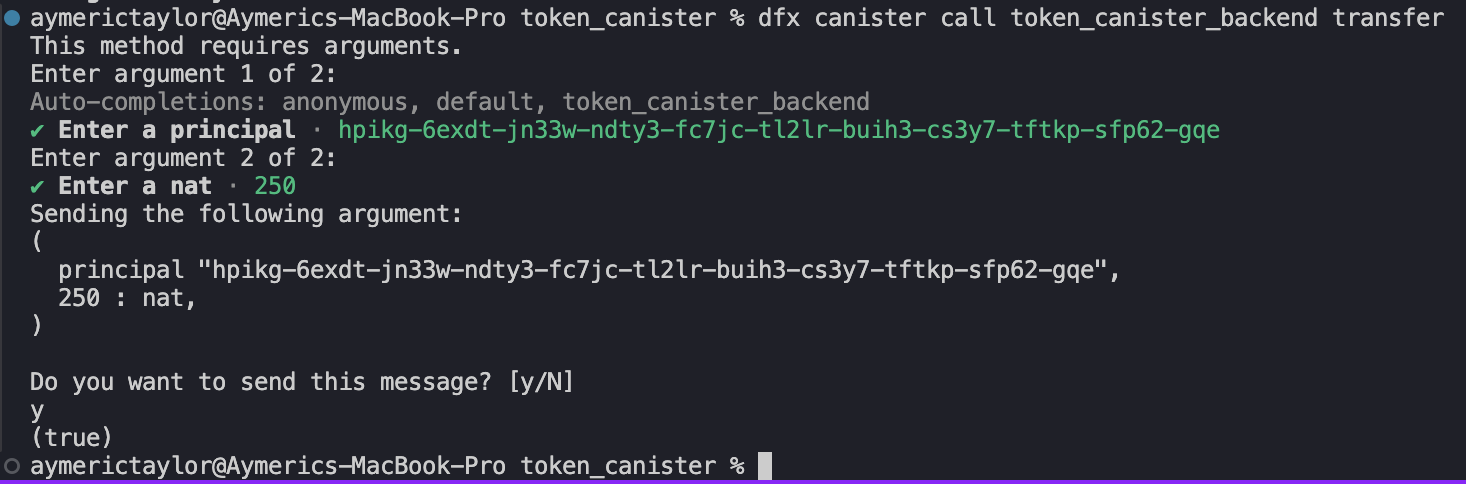
Cross-check Alice’s balance and the random principal’s balance:
Alice would have a remaining balance of 750.
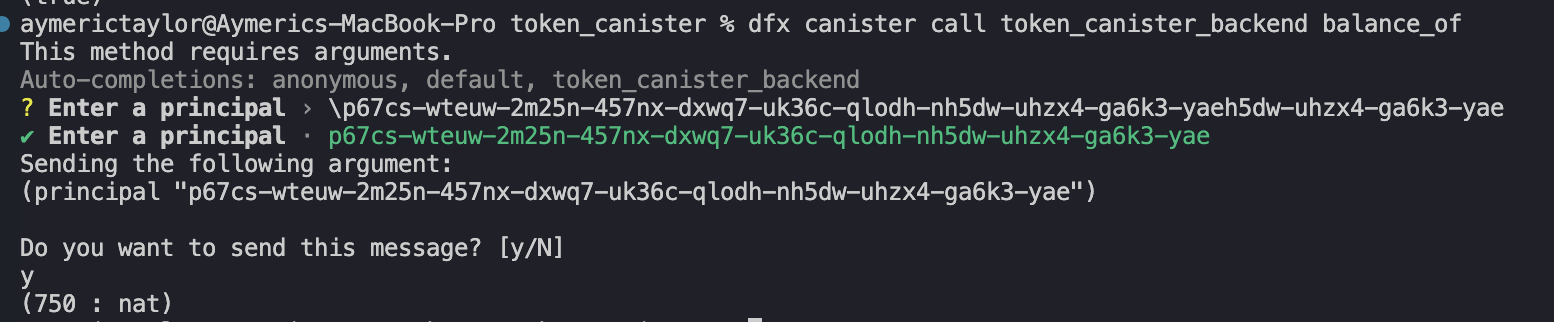
And hpikg-6exdt-jn33w-ndty3-fc7jc-tl2lr-buih3-cs3y7-tftkp-sfp62-gqe a new balance of 250.

Approve Spender
The approve(spender, amount) function gives authority to a spender to transfer tokens on behalf of the msg_caller().
Since we’re currently using Alice, we’ll approve default to spend all of its balance and transfer it to the random Identity again (hpikg-6exdt-jn33w-ndty3-fc7jc-tl2lr-buih3-cs3y7-tftkp-sfp62-gqe).
Call approve and pass default’s principal as the first argument and 750 as the second.
dfx canister call token_canister_backend approve
Then switch dfx identities to default and invoke the transfer_from() function pass:
From: Alice’s PrincipalTo:hpikg-6exdt-jn33w-ndty3-fc7jc-tl2lr-buih3-cs3y7-tftkp-sfp62-gqeAmount: 750
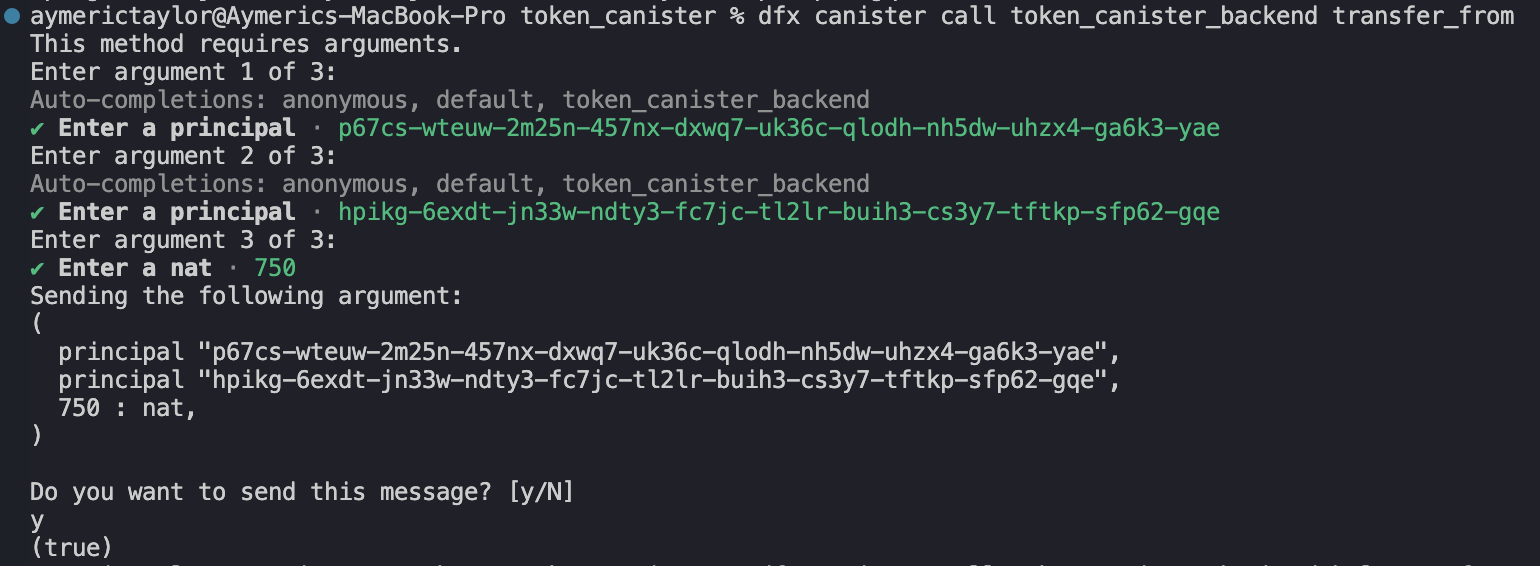
Check that the random identity’s balance is now 1000

And Alice’s is now 0.

ICP Javascript Agent
We have learnt how to interface with token_canister using dfx, the next article teaches how to use ICP Javascript Agent, similar to Ethers.js, to interact with token_canister, and in extension other canisters.