指令内省(Instruction introspection)使得 Solana 程序能够在同一笔交易(transaction)中读取除自身之外的其他指令(instruction)。
通常情况下,程序只能读取针对自身的指令。Solana runtime(运行时)会将每条指令路由到指令中指定的程序。
一笔 Solana 交易可以包含多条指令,每条指令可针对不同的程序。例如,在同一笔交易中,程序 A 可能会收到指令 Ax,程序 B 收到指令 Bx。通过内省机制,程序 B 可以读取指令 Ax 和 Bx 的内容。
例如,假设你想确保任何与你 DeFi 程序的交互,都必须在同一笔交易中先向你的金库转账 0.5 SOL。你可以通过内省这些指令来强制执行此规则:如果在与你程序交互的指令之前,未包含所需的 0.5 SOL 转账指令,则拒绝整笔交易。
在本文中,我们将学习内省的工作原理,以及如何在你的 Solana 程序中实现它。
交易与指令
在研究指令内省之前,让我们先详细回顾一下交易和指令。
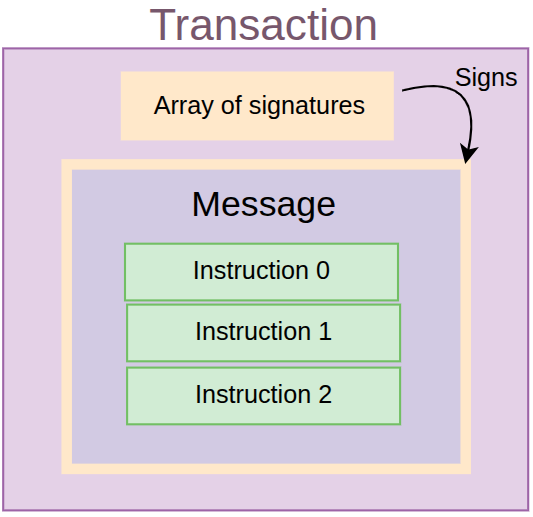
Solana 交易是一个包含两个字段的 struct:消息(message)和对该消息签名的签名列表(signatures)。该消息包含一个按顺序执行的指令数组。
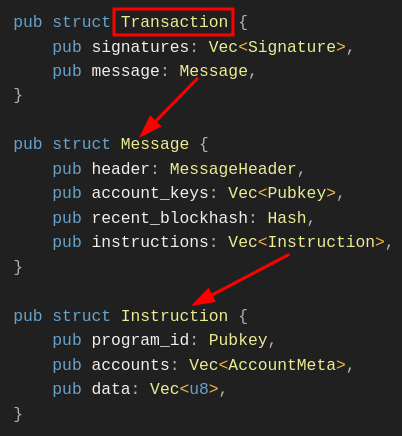
下面的代码(直接来自 Solana SDK)展示了一笔交易的 struct 表示:
pub struct Transaction {
pub signatures: Vec<Signature>,
pub message: Message,
}
交易消息
交易消息保存了指令列表,以及这些指令将共同访问的所有账户公钥(account keys)的并集。它还保存了 runtime 所需的一些额外数据,例如最近的区块哈希(recent blockhash)和消息头(message header)。
pub struct Message {
pub instructions: Vec<Instruction>,
pub account_keys: Vec<Address>,
pub recent_blockhash: Hash,
pub header: MessageHeader,
}
以下是每个组件的详细说明:
- Instructions(指令):每条指令都是对链上程序的调用。一条指令包含三个组件:
- Program ID(程序 ID):包含被调用指令业务逻辑的程序地址。
- Accounts(账户):指向交易 account keys(账户公钥列表)的索引。这些索引将指令映射到它需要读取或写入的特定账户。
- Instruction data(指令数据):一个字节数组,用于指定要调用程序上的哪个函数,以及该指令所需的任何参数。
- Account keys(账户公钥):这是每条指令中列出的所有账户的并集。
- Recent blockhash(最近区块哈希):将交易绑定到一个短暂的 slot(插槽)窗口并防止重放攻击的最近区块哈希。
- Message header(消息头):指定有多少账户对交易进行了签名,以及哪些账户是只读的,哪些是可写的。
Instruction struct(指令结构体)
以下是 Instruction 的 struct 定义,摘自 GitHub 上的 Solana 源码:
pub struct Instruction {
/// Pubkey of the program that executes this instruction.
pub program_id: Pubkey,
/// Metadata describing accounts that should be passed to the program.
pub accounts: Vec<AccountMeta>,
/// Opaque data passed to the program for its own interpretation.
pub data: Vec<u8>,
}
pub struct AccountMeta {
/// An account's public key.
pub pubkey: Pubkey,
// True if the instruction requires a signature for this pubkey
/// in the transaction's signatures list.
pub is_signer: bool,
/// True if the account data or metadata may be mutated during program execution.
pub is_writable: bool,
}
指令使用的每个账户由 AccountMeta 类型表示,它存储了账户的公钥以及签名者(signer)和可写(writable)标志位。
交易与指令之间的关系总结
综合以上内容,下图展示了交易、消息和指令之间的关系。
一笔 Transaction 包含一个签名列表和一个消息。一个 Message 包含一个头部、账户公钥列表、一个最近的区块哈希,以及一个指令列表。一条 Instruction 包含一个程序 ID、它使用的账户(该数据索引至 Message struct 中的 account keys 列表),以及指令数据。
使用 instruction Sysvar 进行指令内省
让我们首先检查 Solana 的 Sysvar 账户,来讨论内省是如何工作的。
Sysvar 是一种特殊的只读账户,包含由 Solana runtime 维护的动态更新数据,并将内部网络状态暴露给程序。我们实际上是从这个账户读取数据——而不是对某个程序发起 CPI(跨程序调用)。
我们在本系列之前的文章中讨论过不同类型的 Sysvar。要了解更多信息,请阅读文章“Solana Sysvars 详解”。
指令内省使用 instruction Sysvar 账户来访问当前交易的序列化指令向量(包含 program_id、accounts 和 data)。例如,在一笔包含多条指令的交易中,程序可以读取并分析任何指令,而不仅仅是当前的指令。
此动画展示了一个指令内省的场景:在执行指令 1 时,程序可以读取指令 2 和指令 3 的内容。
与 Solana 中的常规账户不同,instruction Sysvar 账户不持久化数据;它仅在交易生命周期内被填充,并在执行完成后被清除。
instruction Sysvar 账户地址为 Sysvar1nstructions1111111111111111111111111。它包含当前交易中所有指令的序列化列表。正如我们前面所看到的,每个条目都包含程序 ID、账户和指令数据。以下是每条反序列化指令的 Rust struct(摘自前文):
pub struct Instruction {
/// Pubkey of the program that executes this instruction
pub program_id: Pubkey,
/// Metadata describing accounts that should be passed to the program
pub accounts: Vec<AccountMeta>,
/// Opaque data passed to the program for its own interpretation
pub data: Vec<u8>,
}
Solana Rust SDK 提供了几个辅助函数来访问 instruction sysvar 账户中序列化的指令。然而,SDK 并没有提供一个直接返回所有指令的单个函数;相反,它只提供了在特定索引处反序列化单条指令的函数。
你仍然可以手动读取和反序列化 sysvar 账户中的指令列表,但这样做容易出错,因此,建议使用 SDK 来反序列化指令。
以下是 Solana Rust SDK 为内省提供的两个关键辅助函数:
load_current_index_checked– 程序可以使用此辅助函数获取自身在交易列表中的索引,然后通过相对位置查找其他指令。load_instruction_at_checked– 加载特定索引处的指令并将其反序列化为Instructionstruct。一旦使用load_current_index_checked函数获得了当前索引,就可以使用该函数来内省之前或之后的指令。我们将在本文后面的部分看到如何做到这一点。
首先,为了理解这些辅助函数的工作原理,让我们看一下 instruction sysvar 账户的数据布局(layout)。它被组织成三个区域:
- 头部(The header)
- 指令部分(The instructions)
- 当前执行指令的索引(The index of the currently executing instruction)
1. 头部区域
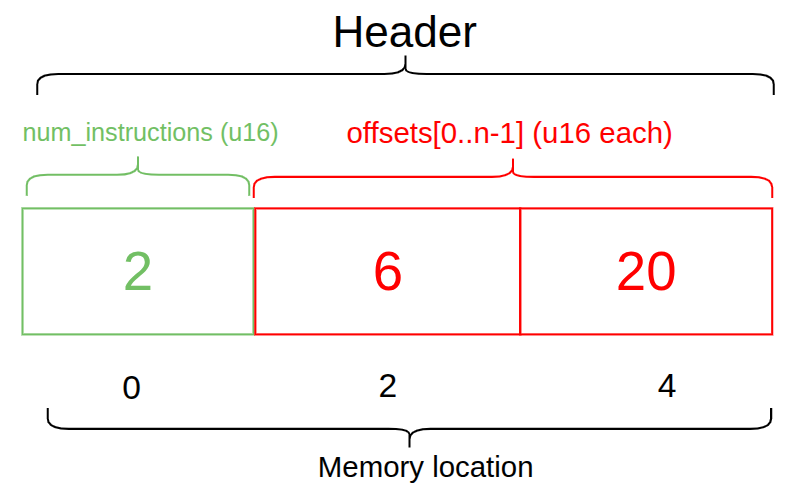
头部指定了交易中的指令数量以及指令的偏移量(offsets,指向指令开始的位置)。下图展示了一个包含 2 条指令的交易头部,因此有两个偏移量:一个从内存位置 6 开始,另一个从内存位置 20 开始。
2. 指令区域
指令区域始于偏移量指示的字节位置(下图中的红框仅为偏移量的视觉标记,并非实际的内存位置)。从该位置开始,它包含账户元数据、程序 ID、指令数据的长度,最后是指令数据本身。如果有多条指令,该结构会对每一条指令重复出现。

3. 当前正在执行指令的索引
最后,当前正在执行的指令的索引存储在 Sysvar 布局的末尾。

如果程序知道了当前执行指令的索引,它就可以获得与其相对的其他指令。
访问指令
既然我们已经研究了 Sysvar 账户中的数据是如何布局的,接下来我们来看一个实际的例子。我们将使用内省的两个辅助方法:load_current_index_checked 和 load_instruction_at_checked,来访问交易中的指令。出于本文的目的,我们将使用一个基础的转账交易。
我们的示例程序将验证是否有一条系统转账(system transfer)指令位于其自身指令之前。只有满足该条件,交易才会成功。
Transaction:
├── Instruction 0: System Transfer (user pays X lamports)
└── Instruction 1: This program (verifies the payment)
设置程序
为了跟上进度,你应该已经设置好了 Solana 开发环境,如果没有,请阅读本系列的第一篇文章。
初始化一个新的 Anchor 应用:
anchor init instruction-introspection
在 program/src/Cargo.toml 中更新依赖项以包含 bincode(bincode=1.3.3)。我们将使用 bincode 库来反序列化系统指令:
//... rest of toml file content
[dependencies]
anchor-lang = "0.31.1"
**bincode = "1.3.3" # add this**
我们将在此项目中使用 Devnet。在你的根目录创建一个 .env 文件,并添加以下 provider 和 wallet 的导出:
export ANCHOR_PROVIDER_URL=https://api.devnet.solana.com
export ANCHOR_WALLET=~/.config/solana/id.json
同样更新 Anchor.toml 文件以使用 devnet 的 provider 和 wallet。
[provider]
cluster = "https://api.devnet.solana.com"
wallet = "~/.config/solana/id.json"
另外,因为你需要一些 SOL 来支付 Devnet 上的手续费,请运行 solana airdrop 2 来获取 2 个 SOL,这对于本例来说绰绰有余。
导入依赖
现在,我们将导入此示例所要使用的 Anchor 依赖,以替换 program/src/lib.rs 文件中的代码。重要的是,我们从 sysvar::instructions 中导入了 load_instruction_at_checked 和 load_current_index_checked:
use anchor_lang::prelude::*;
use anchor_lang::solana_program::{
system_program,
sysvar::instructions::{
load_instruction_at_checked,
load_current_index_checked
},
system_instruction::SystemInstruction,
};
然后我们将声明程序 ID 并添加一个 verify_transfer 函数,它将:
- 获取当前指令索引,以了解当前正在执行的指令在交易中的位置。
- 通过使用链上 Solana Rust SDK 对 sysvar 账户中的指令列表进行反序列化,以加载前一条指令。
- 通过检查程序 ID 是否与系统程序(system program)匹配来验证加载的指令是否是系统转账指令,然后解析指令数据以确认转账金额是否与预期金额匹配。
- 验证指令涉及的账户数量为 2。
- 最后,我们将定义 sysvar 账户的 struct。
请查看下面的完整代码。我们添加了注释来标注上述步骤:
use anchor_lang::prelude::*;
use anchor_lang::solana_program::{
system_program,
sysvar::instructions::{load_instruction_at_checked, load_current_index_checked},
system_instruction::SystemInstruction,
};
declare_id!("BxQuawTcvJkT2JM1qKeW6wyM4i5VCuM122v9tVsSrmwm");
#[program]
pub mod check_transfer {
use super::*;
pub fn verify_transfer(ctx: Context<VerifyTransfer>, expected_amount: u64) -> Result<()> {
// Step 1: Get current instruction index to understand our position
**let current_ix_index = load_current_index_checked(&ctx.accounts.instruction_sysvar)?;**
msg!("Currently executing instruction index: {}", current_ix_index);
// Step 2: Load the previous instruction
let transfer_ix = load_instruction_at_checked(
(current_ix_index - 1) as usize,
&ctx.accounts.instruction_sysvar
).map_err(|_| error!(ErrorCode::MissingInstruction))?;
// Step 3: Verify it's a system program instruction
require_keys_eq!(transfer_ix.program_id, system_program::ID, ErrorCode::NotSystemProgram);
// Step 4: Parse the system instruction data
let system_ix = bincode::deserialize(&transfer_ix.data)
.map_err(|_| error!(ErrorCode::InvalidInstructionData))?;
match system_ix {
SystemInstruction::Transfer { lamports } => {
require_eq!(lamports, expected_amount, ErrorCode::IncorrectAmount);
msg!("✅ Verified transfer of {} lamports", lamports);
}
_ => return Err(error!(ErrorCode::NotTransferInstruction)),
}
// Step 5: Verify accounts involved in the transfer
require_gte!(transfer_ix.accounts.len(), 2, ErrorCode::InsufficientAccounts);
let from_account = &transfer_ix.accounts[0];
let to_account = &transfer_ix.accounts[1];
require!(from_account.is_signer, ErrorCode::FromAccountNotSigner);
require!(from_account.is_writable, ErrorCode::FromAccountNotWritable);
require!(to_account.is_writable, ErrorCode::ToAccountNotWritable);
msg!("✅ Transfer accounts properly configured");
msg!("From: {}", from_account.pubkey);
msg!("To: {}", to_account.pubkey);
Ok(())
}
}
#[derive(Accounts)]
pub struct VerifyTransfer<'info> {
/// CHECK: This is the instruction sysvar account
#[account(address = anchor_lang::solana_program::sysvar::instructions::ID)]
pub instruction_sysvar: AccountInfo<'info>,
}
以下是我们使用的错误代码(error codes),你应将其添加到同一个文件中:
#[error_code]
pub enum ErrorCode {
/// Thrown when attempting to load an instruction at an index that doesn't exist
/// in the transaction (e.g., trying to access index -1 when current is 0)
#[msg("Missing required instruction in transaction")]
MissingInstruction,
/// Thrown when the previous instruction's program_id doesn't match the System Program
/// Ensures we're only validating actual system program instructions
#[msg("Instruction is not from System Program")]
NotSystemProgram,
/// Thrown when bincode fails to deserialize the instruction data into SystemInstruction
/// Indicates malformed or corrupted instruction data
#[msg("Invalid instruction data format")]
InvalidInstructionData,
/// Thrown when the SystemInstruction variant is not Transfer
/// (e.g., it's CreateAccount, Allocate, or another system instruction type)
#[msg("Instruction is not a transfer")]
NotTransferInstruction,
/// Thrown when the actual lamports amount in the transfer doesn't equal expected_amount
/// Protects against front-running or incorrect payment amounts
#[msg("Transfer amount does not match expected amount")]
IncorrectAmount,
/// Thrown when the transfer instruction has fewer than 2 accounts
/// A valid transfer requires at least [from, to] accounts
#[msg("Transfer instruction has insufficient accounts")]
InsufficientAccounts,
/// Thrown when the 'from' account in the transfer didn't sign the transaction
/// Prevents unauthorized transfers
#[msg("From account is not a signer")]
FromAccountNotSigner,
/// Thrown when the 'from' account is not marked as writable
/// Required because the account balance will be debited
#[msg("From account is not writable")]
FromAccountNotWritable,
/// Thrown when the 'to' account is not marked as writable
/// Required because the account balance will be credited
#[msg("To account is not writable")]
ToAccountNotWritable,
}
在上述代码中,我们获取了当前指令的索引,使用该 ID(索引)加载了前一条指令以进行检查。因为指令是按顺序排列的,我们只需将当前索引减 1 即可加载。
现在,让我们构建、部署该程序,并使用 JavaScript 与其进行交互。
运行 anchor build && anchor deploy 来构建并部署项目。你应该会看到类似如下的输出,表明其已成功部署:

使用 Typescript 与程序代码进行交互
创建一个简单的 Typescript 脚本,通过我们的程序向某个地址转账 1 SOL。
为了直接运行 Typescript 文件,你将用到 bun.js。如果你还没安装,可以通过在终端运行 curl -fsSL [https://bun.sh/install](https://bun.sh/install) | bash 进行安装。
创建一个 scripts/ 文件夹,在其中添加一个 introspect.ts 文件,并将以下代码粘贴进去。我添加了注释以帮助你理解代码的逻辑流程。
import * as anchor from "@coral-xyz/anchor";
import { Program } from "@coral-xyz/anchor";
import { SystemProgram, SYSVAR_INSTRUCTIONS_PUBKEY, Transaction, Keypair } from "@solana/web3.js";
import { CheckTransfer } from "../target/types/check_transfer";
async function main() {
console.log("🚀 Starting verification script...");
// --- Setup Connection and Program ---
// Configure the client to use the local cluster.
const provider = anchor.AnchorProvider.env();
anchor.setProvider(provider);
// Load the Anchor program from the workspace.
const program = anchor.workspace.CheckTransfer as Program<CheckTransfer>;
// --- Prepare Accounts and Data ---
// The 'payer' is the wallet that signs and pays for the transaction.
const payer = provider.wallet.publicKey;
// A new, random keypair to act as the recipient.
const recipient = Keypair.generate().publicKey;
// Define the transfer amount using anchor.BN for u64 safety.
const transferAmount = new anchor.BN(1_000_000_000); // 1 SOL
console.log(`- Payer: ${payer}`);
console.log(`- Recipient: ${recipient}`);
console.log(`- Amount: ${transferAmount.toString()} lamports`);
// --- Build the Transaction ---
// A transaction is a container for one or more instructions.
const tx = new Transaction();
// Instruction 0: The System Program Transfer.
// This must immediately precede our program's instruction.
tx.add(
SystemProgram.transfer({
fromPubkey: payer,
toPubkey: recipient,
lamports: transferAmount.toNumber(), // Safe for 1 SOL
})
);
// Instruction 1: Our program's verification instruction.
tx.add(
await program.methods
.verifyTransfer(transferAmount)
.accounts({
instructionSysvar: SYSVAR_INSTRUCTIONS_PUBKEY,
})
.instruction()
);
// --- Send Transaction and Verify Outcome ---
try {
const sig = await provider.sendAndConfirm(tx);
console.log("\n✅ Transaction confirmed!");
console.log(`Signature: ${sig}`);
// Fetch the transaction details to inspect the logs.
const txInfo = await provider.connection.getTransaction(sig, {
commitment: "confirmed",
maxSupportedTransactionVersion: 0,
});
console.log("\n📄 Program Logs:");
console.log(txInfo?.meta?.logMessages?.join("\n"));
// Check for the success message in the logs.
const logs = txInfo?.meta?.logMessages;
if (!logs || !logs.some(log => log.includes(`Verified transfer of ${transferAmount} lamports`))) {
throw new Error("Verification log message not found!");
}
console.log("\n✅ Verification successful!");
} catch (error) {
console.error("\n❌ Transaction failed!");
console.error(error);
process.exit(1); // Exit with a non-zero error code
}
}
// --- Script Entrypoint ---
main().then(
() => process.exit(0),
err => {
console.error(err);
process.exit(1);
}
);
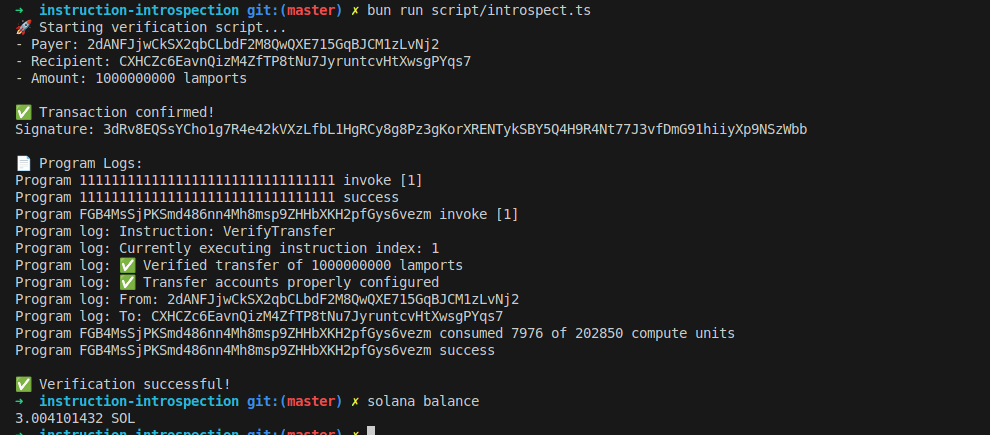
当我们使用 bun run script/introspect.ts 运行客户端代码时,我们应该能看到它成功运行,并输出类似以下内容:
指令内省的注意事项:检查时避免使用绝对索引
从 sysvar 账户中以绝对索引(如 0)加载指令,可能会让攻击者在多次调用中重复使用该指令。
例如,如果你的程序要求用户在同一笔交易中提款(withdraw)前必须先向你的金库转账(transfer funds),使用绝对索引可能会让攻击者在索引 0 处放置一次单笔转账,然后发起多次提款操作,而所有这些提款都会利用同一笔转账通过验证。
相反,应使用相对指令索引来确保转账发生在提款指令之前紧邻的位置,就像我们前面在示例中所展示的那样。
let transfer_ix = load_instruction_at_checked(
(current_ix_index - 1) as usize,
&ctx.accounts.instruction_sysvar
)
这可确保被检查的指令是对应于当前提款的正确转账操作,而不是复用了交易中较早前的转账。
本文是 Solana 教程系列 的一部分。