在 Solana 中,sysvars(系统变量)是只读的系统账户,允许 Solana 程序访问区块链状态以及网络信息。它们类似于 Ethereum 的全局变量(后者也使智能合约能够访问网络或区块链状态信息),但它们具有像 Ethereum 预编译合约(precompiles)那样唯一的公共地址。
在 Anchor 程序中,你可以通过两种方式访问 sysvars:要么使用 Anchor 的 get 方法封装器,要么将其视为 #[Derive(Accounts)] 中的一个账户,使用其公共地址。
并非所有的 sysvars 都支持 get 方法,并且有些已被弃用(关于弃用的信息将在本指南中具体说明)。对于那些没有 get 方法的 sysvars,我们将使用它们的公共地址来访问。
- Clock: 用于与时间相关的操作,如获取当前时间或 slot 编号。
- EpochSchedule: 包含关于 epoch 调度的信息,包括特定 slot 所属的 epoch。
- Rent: 包含租金费率和使账户免交租金所需的最低余额要求等信息。
- Fees: 包含当前 slot 的费用计算器。费用计算器提供有关在 Solana 交易中每个签名需要支付多少 lamports 的信息。
- EpochRewards: EpochRewards sysvar 保存着 Solana 中 epoch 奖励分配的记录,包括区块奖励和质押奖励。
- RecentBlockhashes: 包含活跃的近期区块哈希(block hashes)。
- SlotHashes: 包含近期 slot 哈希的历史记录。
- SlotHistory: 保存 Solana 最近一个 epoch 期间可用 slot 的数组,并在每次处理新 slot 时更新。
- StakeHistory: 以 epoch 为单位维护整个网络质押激活和取消激活的记录,并在每个 epoch 开始时更新。
- Instructions: 用于访问当前交易中包含的序列化指令(instructions)。
- LastRestartSlot: 包含上次重启(Solana 上次重启时)的 slot 编号,如果从未重启过,则为 0。如果 Solana 区块链崩溃并重启,应用程序可以使用此信息来确定是否应该等待直到系统稳定。
区分 Solana slots 和 blocks
slot(时隙)是一个时间窗口(约 400 毫秒),在此期间指定的领导者(leader)可以生成一个 block(区块)。一个 slot 包含一个 block(与 Ethereum 上的区块相同,即一个交易列表)。然而,如果区块领导者在该 slot 期间未能生成区块,那么这个 slot 可能不包含 block。它们的关系如下图所示:

尽管每个 block 都精确映射到一个 slot,但 block hash(区块哈希)并不等于 slot hash(时隙哈希)。在区块浏览器中点击 slot 编号时,这一区别显而易见,它会打开一个具有不同哈希值的区块详情页面。
让我们以下图中的 Solana 区块浏览器为例:
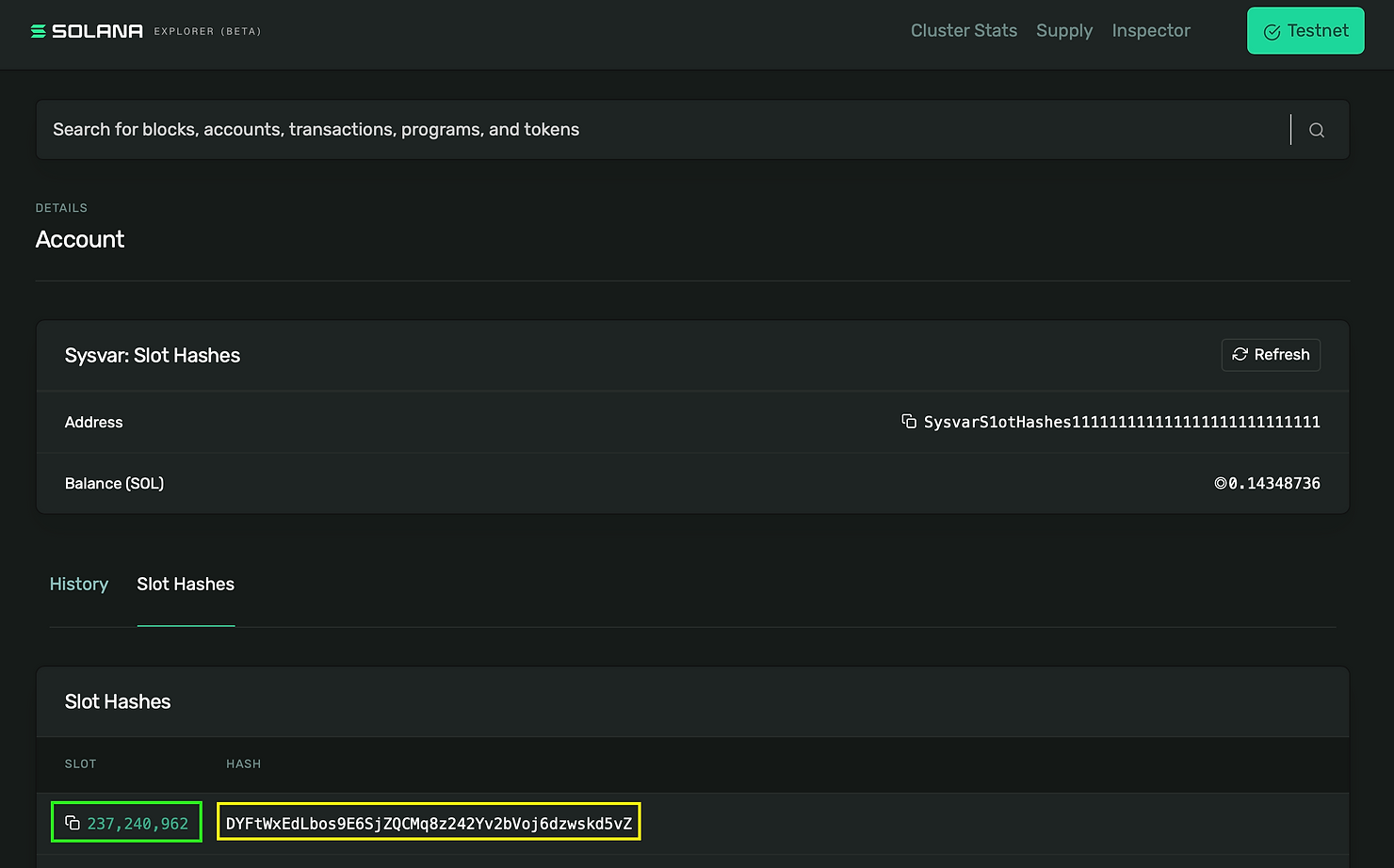
图中高亮的 绿色数字 是 slot 编号 237240962,高亮的 黄色文本 是 slot hash DYFtWxEdLbos9E6SjZQCMq8z242Yv2bVoj6dzwskd5vZ。下方高亮为 红色 的 block hash 则是 FzHwFHDAXJBc55rpjShznGCBnC7DsTCjxf3KKAk6hk9T。
(其他区块详细信息已被裁剪):

即便它们具有相同的编号,我们也能通过它们各自独特的哈希值来区分 block 和 slot。
作为测试,点击浏览器中 此处 的任何 slot 编号,你会发现将打开一个 block 页面。这个 block 将具有与 slot hash 不同的哈希值。
在 Anchor 中使用 get 方法访问 Solana Sysvars
如前所述,并非所有 sysvars 都能通过 Anchor 的 get 方法访问。像 Clock、EpochSchedule 和 Rent 等 sysvars 可以使用此方法进行访问。
虽然 Solana 文档将 Fees 和 EpochRewards 列为可通过 get 方法访问的 sysvars,但它们在最新版本的 Anchor 中已被弃用。因此,在 Anchor 中无法使用 get 方法调用它们。
我们将使用 get 方法访问并打印当前支持的所有 sysvars 的内容。首先,我们创建一个新的 Anchor 项目:
anchor init sysvars
cd sysvars
anchor build
Clock sysvar
要使用 Clock sysvar,我们可以如下所示调用 Clock::get() 方法(我们在之前的教程中做过类似的操作)。
在我们项目的 initialize 函数中添加以下代码:
pub fn initialize(ctx: Context<Initialize>) -> Result<()> {
// Get the Clock sysvar
let clock = Clock::get()?;
msg!(
"clock: {:?}",
// Retrieve all the details of the Clock sysvar
clock
);
Ok(())
}
现在,在一个本地 Solana 节点上运行测试并查看日志:

EpochSchedule sysvar
Solana 中的 epoch(纪元)是一个大约两天的时段。SOL 只能在 epoch 开始时进行质押或解除质押。如果你在 epoch 结束之前质押(或解除质押)SOL,那么在等待 epoch 结束时,这些 SOL 会被标记为 “activating”(激活中)或 “deactivating”(取消激活中)。
Solana 在其关于 委托 SOL 的描述中对此进行了更多说明。
我们可以使用 get 方法访问 EpochSchedule sysvar,类似于 Clock sysvar。
使用以下代码更新 initialize 函数:
pub fn initialize(ctx: Context<Initialize>) -> Result<()> {
// Get the EpochSchedule sysvar
let epoch_schedule = EpochSchedule::get()?;
msg!(
"epoch schedule: {:?}",
// Retrieve all the details of the EpochSchedule sysvar
epoch_schedule
);
Ok(())
}
再次运行测试后,将生成以下日志:

从日志中,我们可以观察到 EpochSchedule sysvar 包含以下字段:
- 高亮为 黄色 的 slots_per_epoch 保存了每个 epoch 中的 slots 数量,这里是 432,000 个 slots。
- 高亮为 红色 的 leader_schedule_slot_offset 决定了下一个 epoch 领导者调度的时间(我们在第 11 天曾讨论过这个内容)。它也被设置为 432,000。
- 高亮为 紫色 的 warmup 是一个布尔值,用于指示 Solana 是否处于预热阶段。在此阶段,epochs 初始较短,然后逐渐变长。这有助于网络在重置后或初期阶段平稳启动。
- 高亮为 橙色 的 first_normal_epoch 标识了第一个具有正常 slot 计数的 epoch,而高亮为蓝色的 first_normal_slot 则是该 epoch 开始时的 slot。在此示例中,两者均为 0。
我们之所以看到 first_normal_epoch 和 first_normal_slot 为 0,是因为测试验证者(test validator)还没有运行满两天。如果我们在主网上运行此命令(在撰写本文时),我们预计将看到 first_normal_epoch 为 576,而 first_normal_slot 为 248,832,000。

Rent sysvar
同样,我们使用 get 方法来访问 Rent sysvar。
我们使用以下代码更新 initialize 函数:
pub fn initialize(ctx: Context<Initialize>) -> Result<()> {
// Previous code...
// Get the Rent sysvar
let rent_var = Rent::get()?;
msg!(
"Rent {:?}",
// Retrieve all the details of the Rent sysvar
rent_var
);
Ok(())
}
运行测试,我们会得到这个日志:

Solana 中的 Rent sysvar 包含三个关键字段:
- lamports_per_byte_year
- exemption_threshold
- burn_percent
高亮为 黄色 的 lamports_per_byte_year 指示了为了免交租金,每年每字节所需的 lamports 数量。
高亮为 红色 的 exemption_threshold 是一个乘数,用于计算免交租金所需的最低余额。在这个例子中,我们看到我们需要为每个字节支付 lamports 才能创建一个新账户。
其中的 50% 将被销毁(高亮为 紫色 的 burn_percent),以管理 Solana 的通货膨胀。
“租金”(rent)的概念将在以后的教程中详细解释。
在 Anchor 中使用 Sysvar 公共地址访问 Sysvars
对于不支持 get 方法的 sysvars,我们可以使用它们的公共地址进行访问。对此的任何例外情况都将被具体说明。
StakeHistory sysvar
回想一下,我们之前提到过该 sysvar 会以 epoch 为单位记录整个网络的质押激活和取消激活状态。然而,由于我们运行的是本地验证者节点,这个 sysvar 将返回空数据。
我们将使用它的公共地址 SysvarStakeHistory1111111111111111111111111 来访问此 sysvar。
首先,我们按如下方式修改项目中的 Initialize 账户结构体:
#[derive(Accounts)]
pub struct Initialize<'info> {
/// CHECK:
pub stake_history: AccountInfo<'info>, // We create an account for the StakeHistory sysvar
}
我们建议读者目前将这种新语法视为样板代码(boilerplate)。/// CHECK: 和 AccountInfo 将在之后的教程中解释。对于好奇的读者来说,<'info> 标记是一个 Rust 生命周期(lifetime)。
接下来,我们将以下代码添加到 initialize 函数中。
(在我们的测试中,对 sysvar 账户的引用将作为交易的一部分传入。而之前的示例已经将它们内置在 Anchor 框架中了。)
pub fn initialize(ctx: Context<Initialize>) -> Result<()> {
// Previous code...
// Accessing the StakeHistory sysvar
// Create an array to store the StakeHistory account
let arr = [ctx.accounts.stake_history.clone()];
// Create an iterator for the array
let accounts_iter = &mut arr.iter();
// Get the next account info from the iterator (still StakeHistory)
let sh_sysvar_info = next_account_info(accounts_iter)?;
// Create a StakeHistory instance from the account info
let stake_history = StakeHistory::from_account_info(sh_sysvar_info)?;
msg!("stake_history: {:?}", stake_history);
Ok(())
}
我们没有导入 StakeHistory sysvar,因为我们可以通过使用 super::*; 导入来访问它。如果不是这种情况,我们将导入特定的 sysvar。
并更新测试:
import * as anchor from "@coral-xyz/anchor";
import { Program } from "@coral-xyz/anchor";
import { Sysvars } from "../target/types/sysvars";
describe("sysvars", () => {
// Configure the client to use the local cluster.
anchor.setProvider(anchor.AnchorProvider.env());
const program = anchor.workspace.Sysvars as Program<Sysvars>;
// Create a StakeHistory PublicKey object
const StakeHistory_PublicKey = new anchor.web3.PublicKey(
"SysvarStakeHistory1111111111111111111111111"
);
it("Is initialized!", async () => {
// Add your test here.
const tx = await program.methods
.initialize()
.accounts({
stakeHistory: StakeHistory_PublicKey,
})
.rpc();
console.log("Your transaction signature", tx);
});
});
现在,我们重新运行测试:

正如之前提到的,它为我们的本地验证者返回了空数据。
我们还可以从 Anchor TypeScript 客户端获取 StakeHistory sysvar 的公钥,只需将我们的 StakeHistory_PublicKey 变量替换为 anchor.web3.SYSVAR_STAKE_HISTORY_PUBKEY。
RecentBlockhashes sysvar
如何访问这个 sysvar 已在我们 之前的教程 中讨论过。需要提醒的是,它已被弃用,并且支持将被移除。
Fees sysvar
Fees sysvar 也已被弃用。
Instruction sysvar
此 sysvar 可用于访问当前交易的序列化指令,以及该交易所属的一些元数据。我们将在下面进行演示。
首先,我们更新导入的内容:
#[program]
pub mod sysvars {
use super::*;
use anchor_lang::solana_program::sysvar::{instructions, fees::Fees, recent_blockhashes::RecentBlockhashes};
// rest of the code
}
接下来,我们将 Instruction sysvar 账户添加到 Initialize 账户结构体中:
#[derive(Accounts)]
pub struct Initialize<'info> {
/// CHECK:
pub stake_history: AccountInfo<'info>, // We create an account for the StakeHistory sysvar
/// CHECK:
pub recent_blockhashes: AccountInfo<'info>,
/// CHECK:
pub instruction_sysvar: AccountInfo<'info>,
}
现在,修改 initialize 函数以接收一个 number: u32 参数,并将以下代码添加到 initialize 函数中。
pub fn initialize(ctx: Context<Initialize>, number: u32) -> Result<()> {
// Previous code...
// Get Instruction sysvar
let arr = [ctx.accounts.instruction_sysvar.clone()];
let account_info_iter = &mut arr.iter();
let instructions_sysvar_account = next_account_info(account_info_iter)?;
// Load the instruction details from the instruction sysvar account
let instruction_details =
instructions::load_instruction_at_checked(0, instructions_sysvar_account)?;
msg!(
"Instruction details of this transaction: {:?}",
instruction_details
);
msg!("Number is: {}", number);
Ok(())
}
与之前的 sysvar 我们使用 <sysvar_name>::from_account_info() 来检索不同,在这种情况下,我们利用 Instruction sysvar 提供的 load_instruction_at_checked() 方法。此方法需要传入指令数据的索引(本例中为 0)和 Instruction sysvar 账户作为参数。
更新测试:
import * as anchor from "@coral-xyz/anchor";
import { Program } from "@coral-xyz/anchor";
import { Sysvars } from "../target/types/sysvars";
describe("sysvars", () => {
// Configure the client to use the local cluster.
anchor.setProvider(anchor.AnchorProvider.env());
const program = anchor.workspace.Sysvars as Program<Sysvars>;
// Create a StakeHistory PublicKey object
const StakeHistory_PublicKey = new anchor.web3.PublicKey(
"SysvarStakeHistory1111111111111111111111111"
);
it("Is initialized!", async () => {
// Add your test here.
const tx = await program.methods
.initialize(3) // Call the initialze function with the number `3`
.accounts({
stakeHistory: StakeHistory_PublicKey, // pass the public key of StakeHistory sysvar to the list of accounts needed for the instruction
recentBlockhashes: anchor.web3.SYSVAR_RECENT_BLOCKHASHES_PUBKEY, // pass the public key of RecentBlockhashes sysvar to the list of accounts needed for the instruction
instructionSysvar: anchor.web3.SYSVAR_INSTRUCTIONS_PUBKEY, // Pass the public key of the Instruction sysvar to the list of accounts needed for the instruction
})
.rpc();
console.log("Your transaction signature", tx);
});
});
然后运行测试:

如果我们仔细查看日志,可以看到程序 Id、sysvar instruction 的公钥、序列化数据以及其他元数据。
我们还可以看到序列化指令数据和我们自己的程序日志中都有由 黄色 箭头突出显示的数字 3。高亮为红色的序列化数据是由 Anchor 注入的鉴别器(discriminator),我们可以忽略它。
练习: 访问 LastRestartSlot sysvar
使用上面的方法访问 SysvarLastRestartS1ot1111111111111111111111。请注意,Anchor 没有该 sysvar 的地址,因此你需要创建一个 PublicKey 对象。
在当前版本的 Anchor 中无法访问的 Solana Sysvars
在当前版本的 Anchor 中,无法访问某些 sysvars。这些 sysvars 包括 EpochRewards、SlotHistory 和 SlotHashes。尝试访问这些 sysvars 时,将会导致错误。
通过 RareSkills 了解更多
请查看我们的 Solana 课程 获取更多 Solana 教程;本教程是该课程的一部分。
最初发布于 2024 年 2 月 19 日